
 Home
Home  Apps
Apps  Games
Games  Windows
  Terms of Service
  Cookies & Privacy Policy
  About us
Apple Grapple: Survivor

 4.4
4.4 1,000,000+ Downloads
1197 Version



Information
- Category: Role Playing
- Price: free
- Age Rating: Everyone
- Available on: /
- Developer: Loop Games A.S.
- Updated on: Mar 30, 2026
Pros 
-
 Experience thrilling gameplay
 - Explore vast, immersive worlds
- Team up with friends online
- Craft unique survival strategies
- Face challenging enemies daily
Cons 
-
 Limited character customization options
 - Repetitive gameplay mechanics
- High in-app purchase costs
- Occasional bugs and glitches
- Steep learning curve for new players
Get Installation Details  Google Play
  App Store
Google Play App Store User Reviews
(39.4K Reviews) Frank2026/01/24
after the first level, multiple unskippable ads appear in the middle of gameplay, like you'll kill an enemy and get hit with a 10 second unavoidable ad, which then takes you to the store, which then takes you back to the ad, and after closing the ad 3 times you can get back to the game. for this mandatory ad participation you get nothing. immediate uninstall.
- Drew Prelgauskas2025/04/20
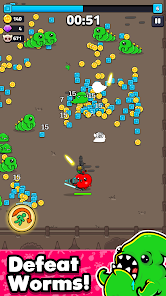
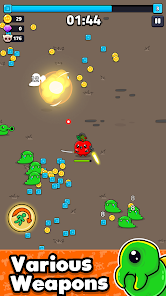
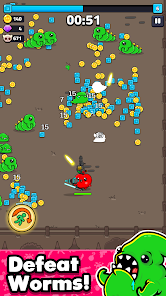
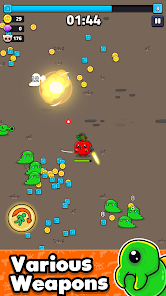
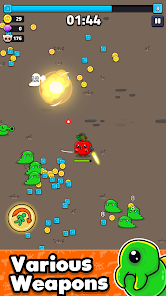
another game that's not like the ads. Those blades that are the central theme on the ads.... barely matter in the game. and ive yet to see an enemy with blades. it's all about equipping guns and shooting green monsters that swarm you. the gameplay itself was kind of fun, but not like the ads, and the game itself is very ad heavy. more so than others in the genre.
- Melvin Moses2025/04/01
the game has a lot of glitches. first of all, the app doesn't open until I try 4-5 times. it loads and suddenly exits. moreover, the ads are a literal waste of time. when you watch an ad expecting for better perks or weapons, almost you get the same one or sometimes even lower level. sometimes it gets stuck in between and when I try to get back to the continuation game, it doesn't respond.
- Tony DeArmas2025/05/15
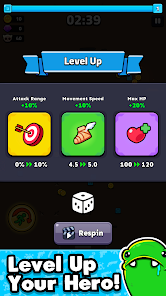
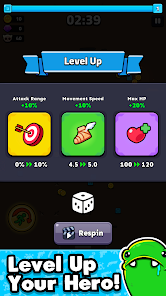
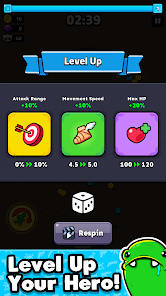
They just changed the ability to roll for new weapons and upgrades and no longer allow you to purchase them with Gems. The only way to re-roll is by forcing you to watch an ad. also, they reduced the number of raids you can do on multiplayer from 5 to 3 and have 3 that you can run if you watch ads. The game has become extremely ad heavy and I refuse to play until it is changed back to the way it was. I was willing to invest $$$ to play and I will not pay for the luxury of watching more ads!!!
- Jeremiah Swing2025/02/19
The difficulty scaling is out of this world. Way too many adds. Adds randomly pop up during game play. If you win one level you will not win the next without buying something. You have to grind grind to get anyway. They make it where you lose 10 out of 11 time you play. Very little money is given to you as well. Over all I give it a thumbs down.
Review Source: Google Play store public user reviews.
How to use Apple Grapple: Survivor
How can I contact customer service for the Apple Grapple: Survivor app?
You can reach customer service through the app's settings or visit the official website for support options.
How do I activate the Apple Grapple: Survivor app?
After downloading, open the app and follow the on-screen instructions to create an account or log in to activate it.
How do I log in to the Apple Grapple: Survivor app?
Open the app, tap on the login button, and enter your registered email and password.
What is the customer number for the Apple Grapple: Survivor app?
The customer number can typically be found in the app's help section or on the official website.
What's New
- - Fix: Minor fixes
Similar Games
















You May Like

I Am Bird
Estoty
4.8

XP Hero
Supercent, Inc.
4.3

Heroes vs Hordes: Survival RPG
SWIFT GAMES
4.7

SWORD OF JUSTICE
Exptional Global
3.9

Super Snail
Qcplay Limited.
4.5

Shiren: Serpentcoil Island
SPIKE CHUNSOFT

Mythic Trials 2
Hypno Games
4.8

Lost Sword
Wemade Connect
4.5

Legend of Mushroom
Joy Nice Games
4.2

Icewind Dale: Enhanced Edition
Beamdog
3.9

Grow Dungeon Hero VIP
pixelstar
4.1

Epic Pirate War
Guangzhou Yitui Information Technology Co., Ltd.
4.6