
 Home
Home  Apps
Apps  Games
Games  Windows
  Terms of Service
  Cookies & Privacy Policy
  About us
Arrow Puzzle - Arrow Madness

 4.9
4.9 500,000+ Downloads
1.8.0 Version

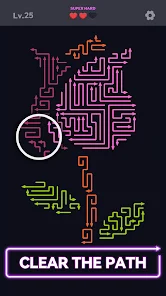

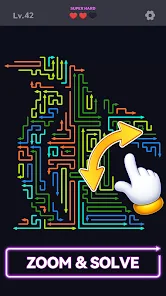




Information
- Category: Puzzle
- Price: free
- Age Rating: Everyone
- Available on: Android, Windows*
- Developer: Ashita Games
- Updated on: Jun 28, 2026
Pros 
-
 Engaging gameplay that challenges your strategic thinking skills
 - Colorful graphics create an immersive puzzle-solving experience
- Variety of levels to keep players entertained for hours
- Simple controls make it accessible for all ages
- Regular updates introduce new puzzles and features to enjoy
Cons 
-
 Limited levels can lead to quick boredom
 - User interface may feel cluttered and confusing
- Lack of multiplayer options reduces competitive fun
- Some puzzles can feel frustratingly difficult to solve
Get Installation Details  Google Play
  App Store
Google Play App Store User Reviews
(109K Reviews) Richard Pena2026/06/18
The Game is okay. So far, the levels are too easy, so more time is spent with ads than play. It wouldn't be a big issue, but the predatory ads are heavy. They force you to the app store, and are difficult to exit. The worst are the Temu ads. They literally open your web browser and take you to the Temu website. I usually just shut down any game with Temu ads. Developers will give the generic responses, but they never fix the issue with predatory ads. This game is headed to the bin.
- Kimberly Hahn2026/05/09
I found this to be very reasonable on ads at low levels of difficulty. By the 60's it started to be after every puzzle. The game offers smooth gameplay, the puzzles are colorful, and are in a wide variety of shapes. This game does not have all the distractions of sub games or competitions, does not require a bunch of tools to complete a puzzle, and is very straightforward. These are the kind of puzzles that appeal to me & I'm good at solving, the 3D type of arrow game offers more challenge.
- Christina Mansour2026/05/22
I installed this game from an ad that showed a trapped robot. I didn't get to free anything until level 54 & it was a cat & a very simple puzzle. Best thing about this game is the lack of ads. Puzzles are pretty easy. The glowing arrows are unique. The experience of tapping on the arrows is very smooth and it's easy to not make a mistake, unlike another arrow game I play where it seems designed to pick the wrong arrow if I'm one hundredths of a millimeter away from the one I intended to tap.
- Norma McClure2026/06/17
Love this arrow puzzle. I have 2, and this one is rapidly becoming my favorite. The puzzles often have shapes to them instead of just generic lines and angles. The challenging ones are clever (hard) and super-challenging ones (super hard). Finally, I like that you know at all times how many more chances you have left at completing a puzzle before you must restart it: I tend to go fast, and this guides me when I'd better slow down.
- Sharon Warren2026/05/11
This is a great arrow game for beginners, but if you're looking for something more challenging, this isn't it. You get 10 coins for each win no matter the difficulty, or if you make a mistake. I haven't found out why coins are collected because theres no lives to lose and nothing to buy. I like the color graphics; all in all a fun game and a fun way to relax.
Review Source: Google Play store public user reviews.
FAQ
Does Arrow Puzzle - Arrow Madness collect my personal data?
Arrow Puzzle - Arrow Madness may collect some user data for functionality and analytics purposes, but it adheres to privacy policies to ensure your information is handled securely.
Does Arrow Puzzle - Arrow Madness offer a free trial or free version?
Yes, Arrow Puzzle - Arrow Madness offers a free version with in-app purchases, allowing users to enjoy the game without an initial cost while providing options for additional features.
Does Arrow Puzzle - Arrow Madness require an internet connection?
Arrow Puzzle - Arrow Madness can be played offline, but some features or updates may require an internet connection to access.
How can I contact support or send feedback for Arrow Puzzle - Arrow Madness?
You can contact support or send feedback for Arrow Puzzle - Arrow Madness through the in-app support feature or by visiting the official website, where you can find additional resources and contact information.
How do I manage or cancel my Arrow Puzzle - Arrow Madness subscription?
You can manage or cancel your Arrow Puzzle - Arrow Madness subscription through the settings of your app store account, where you can view your subscriptions and make changes as needed.
How to use Arrow Puzzle - Arrow Madness
How can I contact customer service for Arrow Puzzle - Arrow Madness?
You can reach customer service through the app's support section or email support
How do I log in to my Arrow Puzzle - Arrow Madness account?
Open the app, tap on 'Log In', and enter your registered email and password to access your account.
Is there a way to activate Arrow Puzzle - Arrow Madness?
If activation is required, follow the in-app instructions after purchase or check your email for an activation link.
What is the customer number for Arrow Puzzle - Arrow Madness?
The customer number is typically found in the app's settings under 'Contact Us' or on the official website.
Similar Games












You May Like

Jigsawcard Solitaire Puzzle
Oakever Games
4.7

Prison Puzzle: Brain Twist
HIGAME LTD.
4.6

Battle Bag: War Zone
VOODOO
4.1

ZOOKEEPER DX TouchEdition
KITERETSU inc.
4.3

Water Match™- ASMR Water Sort
Youyoutang Technology
4.7

Unravel Master: Tangle Puzzle
Supersonic Studios LTD
4.8

Triple Match City
Ferah Games
4.8
Sudoku Pro
AI Factory Limited
4.6

Slow Living Jigsaw Puzzle game
LoveColoring Game
4.9

Screw Tap Jam™: Screw Sort 3D
Shinrays Brain Studio
4.9
Sand Shift: Match & Clear
PlayValley

Magic Sort!
Grand Games A.Ş.
4.5