
 Home
Home  Apps
Apps  Games
Games  Windows
  Terms of Service
  Cookies & Privacy Policy
  About us
Pumply - Pumplog Tracker

 4.7
4.7 50,000+ Downloads
5.5 Version
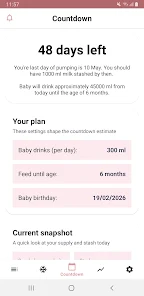
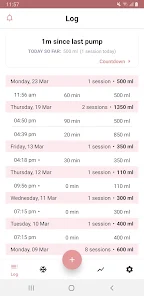
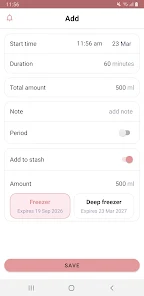
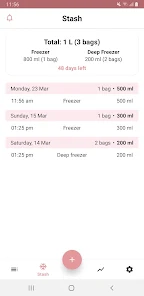
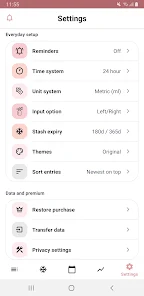
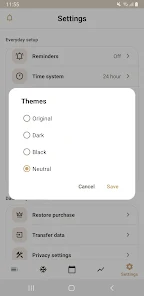
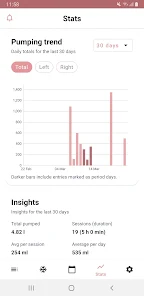
Information
- Category: Parenting
- Price: free
- Age Rating: Everyone
- Available on: /
- Developer: Northlight Studio
- Updated on: May 8, 2026
Pros 
-
 Pumply - Pumplog Tracker app offers a range of benefits to enhance your pumping experience.
 - Easily log your pumping sessions!
- Track milk volume and time!
- Set reminders for pumping times!
- View detailed pumping statistics!
- Share data with caregivers easily!
Cons 
-
 Pumply - Pumplog Tracker app has some drawbacks that users should consider.
 - Limited customization options
- Occasional syncing issues
- User interface can be confusing
- Lacks advanced analytics tools
- No offline access available
Get Installation Details  Google Play
  App Store
Google Play App Store User Reviews
(1.66K Reviews) Tiffany Johnson2026/06/22
very convenient and simple to use. free version provides just what I need and I dont feel pressured to pay for a subscription. ads are minimal and dont take away from the convenience of the app! I just started using it at almost 3 months pp, but I love seeing the total time and output. I have not had any issues saving, the only thing of note is if I switch apps on my phone without saving, then all my information I entered is gone when I switch back to the tab. so I just make sure to save 🤷♀️
- Hillary2026/06/30

the app is great to track pumping sessions, amount, and freezer stash. I do wish it would stop crashing all the time when I open it though. I also wish it would give you the option when using your freezer stash to say how many bags were used if you have multiple with the same amount. It will cross off and use all bags if you push the use button of that oz amount. You have to go in and manually change the amount of bags left so you actually can't track how many have been used accurately.
- Michelle Lippert-Korte2022/06/03
My entries are consistently missing from the day before. This app was $12 and it's messing up. I KNOW for a fact I pumped last night around 11pm, but today the entry is missing and my total is short. Since downloading in April, I've sent 4 emails, 1 Facebook message, and have not received a response. I started taking screenshots of my totals at the end of the day and they are ABSOLUTELY missing the next day.
- Jenny2022/11/29
Can you please add a way for us to delete entries? I accidentally made a mistake on a couple entries but there's no way to delete them. I reset the amounts to zero so they aren't added to the stats but it's annoying that I always have to see them in the log. Otherwise I'm enjoying the app! Easier than writing everything down like I've been doing for the last 3 months!
- Stephie Levsen2023/01/16
Good enough in that it doesn't have a bunch of extras I don't want. I just wish I could see all of my pump dates graphed out, not just the most recent ones. It would be cool to see how production has increased over time. It's also mildly annoying that the quantities keep showing up as 17.99 oz rather than 18 even though I always enter them as whole numbers.
Review Source: Google Play store public user reviews.
FAQ
Can I submit suggestions or feedback to Pumply - Pumplog Tracker?
Yes, users can submit feedback and suggestions through the app or via the official website's contact form.
Does Pumply - Pumplog Tracker collect my personal data?
Pumply prioritizes user privacy and does not collect personal data without consent.
Does Pumply - Pumplog Tracker support offline use?
Yes, Pumply allows users to log their sessions offline, syncing data once an internet connection is available.
How do I cancel my Pumply - Pumplog Tracker subscription?
You can cancel your subscription through your app store settings or within the app's subscription management section.
How much does a subscription to Pumply - Pumplog Tracker cost?
Subscription pricing varies; check the app for the latest pricing details and available plans.
How to use Pumply - Pumplog Tracker
How can I contact customer service for the Pumply app?
You can reach customer service through the app's support section or email support
How do I activate my Pumply account?
After downloading the app, follow the on-screen instructions to create an account and verify your email to activate it.
How do I log in to my Pumply account?
Open the app, enter your registered email and password, then tap 'Log In' to access your account.
What is the customer number for Pumply?
The customer number is typically found in your account settings or on the app's help page.
What's New
- • Improved Countdown estimates and wording• Fixed Countdown and Stash days-left mismatch• Bug fixes
Similar Apps













You May Like

ToguMogu Pregnancy & Parenting
ToguMogu (PVT) Ltd.
4.4

Supermom
Appinion BD Limited

Pregnant Tracker - Baby Bump
Am Foundation Inc
4.1

MMGuardian Parental Control
MMGuardian.com
4.2

Lognexa
APPDUB DIGITAL
4.6

EveryParent
Children's Services Council of Palm Beach County
4.4

Pathways.org Baby Milestones
Pathways.org
4.9

BabyTV - Kids Videos & Songs
Disney
3.7

Breastfeeding & Baby Tracker
ParentLove Baby Tracker by Coquisoft
4.9

Baby Tracker App | Glow
Glow Inc
3.8

Baby + | Your Baby Tracker
Philips Electronics UK Limited
4.7
NextLog
CODEWALL DIJITAL HIZMETLER LIMITED SIRKETI
4.2