
 Home
Home  Apps
Apps  Games
Games  Windows
  Terms of Service
  Cookies & Privacy Policy
  About us
Brewfather

 4.8
4.8 100,000+ Downloads
2.20.2 Version
Information
- Category: Food & Drink
- Price: free
- Age Rating: 17+
- Available on: /
- Developer: Warpkode AS
- Updated on: Apr 27, 2026
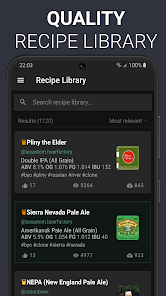
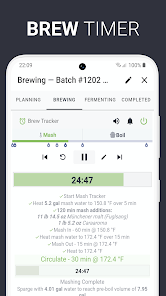
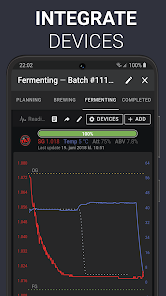
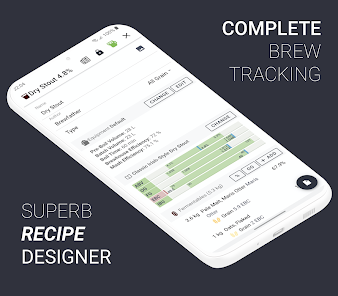
Brewfather is a powerful brewing software designed for homebrewers and professionals alike. It offers an intuitive interface for recipe creation, batch tracking, and ingredient management, making the brewing process seamless and enjoyable. With features like cloud syncing, advanced calculations, and a comprehensive database of ingredients, Brewfather helps brewers of all levels optimize their craft. Whether you're brewing beer, cider, or mead, Brewfather is your go-to companion for achieving consistent and high-quality results.
Features & Highlights
Brewfather stands out in the crowded world of brewing apps by offering a comprehensive suite of features that cater to both novice and experienced brewers. Here are some of the standout features that I found particularly useful:
Real Experience Using Brewfather
Application Scenarios
As an avid homebrewer, Brewfather has seamlessly integrated itself into my brewing routines. I typically start my brewing weekends by browsing through the app to either select an existing recipe or create something new. The intuitive interface makes it easy to find inspiration, whether I’m looking for a light summer ale or a robust stout. Once I settle on a recipe, I can easily adjust the ingredients based on what I have available. Brewfather becomes my brewing companion as I prep my ingredients, and I often refer back to the app to check the specific gravity readings during fermentation. It’s also invaluable when I’m sharing my brewing experiences with friends; I can pull up my notes and recipe at a moment’s notice to discuss what’s working well and what I might change next time.
User Experience
The user interface of Brewfather is sleek and modern, making navigation a breeze. Upon opening the app, I’m greeted with a dashboard that gives me a quick overview of my brewing schedule and any active batches. The workflow is logical—creating a recipe only takes a few taps, and the app guides you through the necessary steps without overwhelming you. Performance-wise, I’ve never encountered lag or crashes, which is crucial when I’m mid-brew and need quick access to my recipe. What I appreciate most is the attention to detail; for instance, the app includes helpful tips and definitions for brewing terms, which is great for newer brewers. Overall, my experience has been overwhelmingly positive, and Brewfather has become an essential tool in my brewing arsenal.
Pricing
Brewfather operates on a freemium model, which means you can access a basic version for free, but advanced features require a subscription. The premium plan is reasonably priced, especially considering the wealth of features it unlocks. I’ve found that the investment is well worth it for the convenience and functionality it offers, particularly for someone like me who brews regularly. The ability to track multiple batches and access all the calculators makes it a valuable tool that justifies the cost.
Updates & Support
The developers of Brewfather are quite responsive, regularly rolling out updates that add new features and address bugs. I’ve noticed improvements in the app’s speed and usability with each update. Additionally, the support team is approachable and helpful; I had a query about syncing my data across devices, and they responded promptly with a clear solution. Their commitment to enhancing user experience is evident, and it's reassuring to know that they value their community of brewers.
Security & Privacy Review
From a security perspective, using Brewfather gives me peace of mind. The app is available on both the App Store and Google Play, which means it undergoes necessary vetting processes to ensure user safety. When registering, I found that Brewfather requires minimal personal information, which is a relief in an age of data breaches. There are no ads cluttering the user interface, and I appreciate that the app does not engage in invasive tracking behavior. My brewing data feels secure, and I have control over what I choose to share. Overall, Brewfather respects user privacy, allowing me to focus on what I love—brewing great beer—without any worries about my personal information being compromised.
Pros 
-
 Brewfather is your ultimate brewing companion!
 - Seamlessly track your recipes!
- Advanced tools for precise brewing!
- Sync data across multiple devices!
- Join a community of passionate brewers!
- Customizable dashboards for insights!
Cons 
-
 Limited customization options
 - Complex interface for beginners
- Requires a subscription for full features
- Occasional syncing issues reported
Get Installation Details  Google Play
  App Store
Google Play App Store User Reviews
(2.79K Reviews) A Google user2026/07/01
Great tool to build beer recipes, and track brew day processes.
- D Cowell2026/03/23
A brilliant app for brewing. It has everything you need and more for helping you to produce that perfect beer. Certainly gives you a lot for your money for this inexpensive app.
- dave kenny2022/03/20
Great brewing tool. Easy to use, clear, well organized GUI. Lots of customizable options, makes recipe adjustments a piece of cake. Enter different amounts of hops or grains and instantly calculate ABV and IBU. Was happy to pay for premium version and have full access to the recipe library and other resources. Good support too. Wasn't sure about a couple things so emailed the developers and got a reply with answers so extra stars for that! And no ads.
- Pierre-Olivier Downey2021/04/15
I really like the app. It's easy to use, instinctive and works well with my ispindel! If I may suggest something for a futur update, I find the evaluation of my beer to be a bit too simple. Yeah, commenting and rating it is good, but I feel like a place for a picture of the beer plus a flavor/aroma spider chart would make it even greater! I hope you'll consider it, cheers! 😉
- James Goodchild2021/01/10
Great app with a really polished UI and allows homebrewers to keep records, alter batches and monitor stock levels. The only think stopping me purchasing the annual subscription is the lack of support for CRS / AMS in the water treatment section. It's a minor point but is widely used in the UK to reduce alkalinity of brewing liquor in place of lactic or phosphoric acid. Even without it the app is great.
Review Source: Google Play store public user reviews.
FAQ
Can Brewfather handle multiple users or team collaboration?
Yes, Brewfather supports multiple users and team collaboration features, making it suitable for breweries that require shared access to recipes and brewing information.
Can Brewfather help with inventory management?
Yes, Brewfather includes inventory management tools that allow users to track their ingredients, equipment, and other brewing supplies, ensuring they have what they need for each brew day.
Can I access Brewfather offline?
While Brewfather's web application requires an internet connection, the mobile app allows for some offline functionality, enabling users to access their data without needing a constant internet connection.
Can I create and manage recipes in Brewfather?
Yes, Brewfather allows users to create, modify, and manage their brewing recipes easily. It includes features for ingredient management, style guidelines, and recipe scaling.
Can I customize my brewing profiles in Brewfather?
Yes, Brewfather allows users to customize their brewing profiles, including specific parameters for different beer styles, water chemistry, and fermentation profiles.
How to use Brewfather
Can I change my Brewfather account email?
Yes, go to your account settings in the app or website to update your email address.
How can I contact Brewfather customer service?
You can reach Brewfather customer service through their support email at support
How do I delete my Brewfather account?
To delete your account, contact Brewfather support through email and request account deletion.
How do I log in to my Brewfather account?
To log in, visit the Brewfather website or app, enter your email and password, then click the login button.
Is there an activation process for Brewfather?
Brewfather does not require activation; simply create an account to start using the app immediately.
What's New
- Fixed: iOS Dynamic Type text scaling default-off + Settings toggle Copied library recipes missing default folder metadata Recipe tag cache stale-revival from route state
Similar Apps














You May Like

McDonald's
McDonald's Apps
2.6

Domino's Pizza USA
Domino's Pizza LLC
4.6

Dairy Queen
International Dairy Queen®️
4.5

Dutch Bros
Dutch Bros Coffee
4.6

7-Eleven
7-Eleven, Inc.
4.8

Chipotle - Fresh Food Fast
Chipotle Mexican Grill
4.7

Grubhub: Food Delivery
Grubhub
4.5

Buffalo Wild Wings
Buffalo Wild Wings, Inc.
3.7

Uncle Julio's
Thanx
3.2

sweetFrog®
Kahala
3.7
Stay Hydrated
The App Dynamics

Rafeeq: Food Delivery in Qatar
Rafeeq
4.3