
 Home
Home  Apps
Apps  Games
Games  Windows
  Terms of Service
  Cookies & Privacy Policy
  About us
Howbout: shared calendar

 4.6
4.6 1,000,000+ Downloads
13.12.0 Version

Information
- Category: Social
- Price: free
- Age Rating: Everyone
- Available on: /
- Developer: Howbout
- Updated on: Jun 29, 2026
Pros 
-
 Stay organized with ease!
 - Effortlessly plan events together!
- Sync with friends and family!
- Never miss important dates!
- User-friendly interface for all!
Cons 
-
 Limited customization options
 - User interface can be cluttered
- Syncing issues with calendars
- Lack of advanced features
- Not suitable for large groups
Get Installation Details  Google Play
  App Store
Google Play App Store User Reviews
(18.6K Reviews) Jay Stiller-Freeman2026/05/07
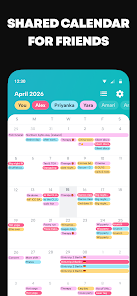
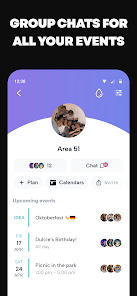
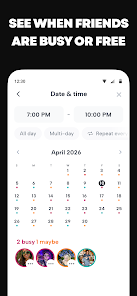
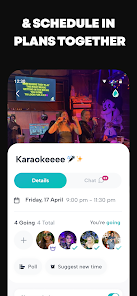
this is honestly a great app. My friend group uses it to invite each other to various things and keep tabs on exactly when everyone is busy, especially helpful for us since we like to go camping altogether in the summer. it lets you do all kinds of things, even choose color palettes for your calendar but also for your friends and their events, and adding gifs to the thumbnail. Each event even has its own chat, so you can talk to each other without cluttering your other group chats. I love it
- Rebecca Jackson2026/02/18

App is good; however, my friend was unable to move past the invite page and use the app as we were all signed up and they were the last to sign up- she was quite literally stuck on the invite page unable to do anything with the app entirely. I've not had this as a problem with the app before when only me and one other friend used it last so this is disheartening that my other friend is unable to join our calendar to see what we're up to.
- Jade2026/05/12
The app does not work on Android. It lets me put my number in, it lets me verify my phone number, but once I get to the email screen it doesn't let me progress from there. And it lags and glitches my phone once I try to leave the app. I've uninstalled, I've restarted, I've cleared storage and cache. It does not work.
- S Harsh2025/05/14
This app is DEFINITELY not ergonomic (easy to use). The daily menu pops up after every single time you add an event, the multi-day event is finicky to select, it doesn't have an option to select days without setting a repeat, it offers the same event if I start typing in a similar title, which is helpful if it would pop up consistently. Overall the menus and general feel of the app are too crowded and repetitive for much use. It's a good app for friend planning, but please improve it.
- Ashley LaCosse2024/05/07
Can't even give an accurate review - the need to invite 3 friends before you can even see if the app works for you... much less 3 other people you know??? That's absolutely ridiculous. I really can't wrap my head around that thought process. Let me just go send random app invites to my friends before I even try the app myself! 🙃🫠 Uninstall 🙄 If the response is going to be the usual "we find our users enjoy the app better with more friends"- save it. It's a business move.
Review Source: Google Play store public user reviews.
How to use Howbout: shared calendar
How can I contact customer service for Howbout?
You can reach Howbout customer service through the app's help section or by visiting their official website for support options.
How do I log in to my Howbout account?
To log in, open the app, enter your email and password, and tap 'Log In.'
Is there an activation process for Howbout?
No activation is required; simply download the app, create an account, and start using it.
What is the customer number for Howbout?
Howbout does not publicly list a customer number; support is primarily provided through their app and website.
What's New
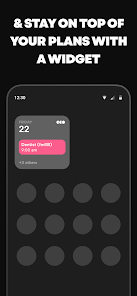
- We’ve made it even easier to get your home screen looking aesthetic.You can now find a brand new widget entry point right inside your Settings, making it quicker than ever to discover and set up your Howbout widgets!
Similar Apps














You May Like

Threads
Instagram
3.9

Text Free
Pinger, Inc
4.4
MeetMe: Chat & Meet New People
MeetMe.com
3.8

Truth Social
T Media Tech LLC
3.1

TikTok Lite - Faster TikTok
TikTok Pte. Ltd.
4.3

ONLYFUN: Random Video Chat
Yoloria Teching Limited
4.2

Lumi: Local Meet Dating
Raja Emran
4.5

HotDate
MENTINLISHA
4.6

Charmed : Swipe Local Singles
PixelDynamics Technolog Limited
4.4

Tiktok
TikTok Pte. Ltd.
4.4

House Party
House Party Studios

purp - Make new friends
hubo Labs
4.3