
 Home
Home  Apps
Apps  Games
Games  Windows
  Terms of Service
  Cookies & Privacy Policy
  About us
Move to iOS

 3.7
3.7 100,000,000+ Downloads
4.0.3 Version
Information
- Category: Tools
- Price: free
- Age Rating: Everyone
- Available on: /
- Developer: Apple
- Updated on: May 19, 2025
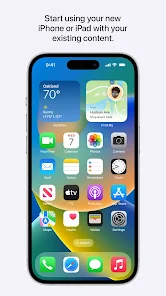
Moving to a new operating system can be a hassle. With all the different apps, data, and settings to bring over, it's easy to feel overwhelmed. However, there is an app that can make your transition much smoother: the Move to iOS app by Apple. The Move to iOS app helps you transfer contacts, photos, messages and more from your Android device to your new iPhone or iPad quickly and securely. In this blog post, we'll discuss how the Move to iOS app works and how it can help you transition from Android to iOS seamlessly.
Features & Highlights
Real Experience Using Move to iOS
Application Scenarios
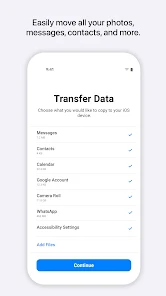
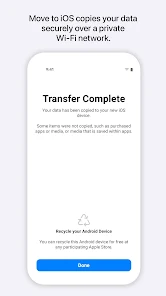
Switching from Android to iOS can be a significant transition, especially for someone like me who has been an avid Android user for years. When I decided to upgrade to an iPhone, I was a little apprehensive about losing my data and having to start fresh. That's where Move to iOS came in. On the day of my switch, I had my new iPhone ready to go, alongside my old Android device. As I prepared to set up my new phone, I opened the Move to iOS app on my Android device, and it guided me through the steps needed to connect the two devices. It was a seamless experience, and I was able to transfer all my important contacts, messages, photos, and even my calendar events in a matter of minutes. This was particularly helpful as I had an important meeting scheduled the very next day!
User Experience
The user interface of Move to iOS is straightforward and intuitive. Upon launching the app, I was greeted with a friendly welcome screen that outlined the steps I needed to follow. The entire workflow is designed for simplicity; each step is clearly laid out, making it easy to understand what to do next. The performance was impressive as well—my data transfer was completed faster than I anticipated, and I didn't encounter any lags or interruptions. Overall, my feelings after using the app were overwhelmingly positive. Transitioning to a new operating system can be stressful, but Move to iOS made the process incredibly smooth and efficient.
Pricing
One of the best aspects of Move to iOS is that it is completely free. There are no hidden fees or in-app purchases, which is refreshing in today's app ecosystem. For anyone looking to make the switch from Android to iOS, this app provides an invaluable service without costing a dime. Given the amount of data it can help transfer, it truly offers fantastic value.
Updates & Support
Apple regularly updates the Move to iOS app to improve its functionality and address any potential bugs. During my usage, I felt reassured knowing that the app was being actively maintained. Should I have encountered any issues, the support resources provided by Apple are excellent. Their online help center offers comprehensive guides and troubleshooting tips, ensuring users can get assistance if needed. Overall, I felt well-supported throughout my experience.
Security & Privacy Review
As an American user, I have significant concerns about security and privacy when using apps, especially those that handle personal data. Move to iOS is available on both the App Store and Google Play, ensuring that it meets the necessary security standards of these platforms. When using the app, I was required to enter minimal personal information, specifically for the transfer process. This made me feel more secure, knowing that my data wasn't being collected for unnecessary purposes.
Moreover, I did not encounter any ads or intrusive tracking behavior while using Move to iOS. Apple is known for its strong stance on privacy, and this app aligns with that ethos by ensuring that user data is transferred securely without any third-party interference. Overall, I felt confident using Move to iOS, knowing that my information was safe throughout the entire process.
Pros 
-
 Seamlessly transfers data from Android to iOS devices
 - Preserves contacts, messages, and photos effortlessly
- Simplifies your transition to a new iPhone
- Ensures a secure and private data transfer
- User-friendly interface makes setup easy for everyone
Cons 
-
 Transfer speed can be slow for large data.
 - Limited compatibility with non-Apple devices.
- Certain apps might not transfer seamlessly.
- Requires a stable Wi-Fi connection to function.
Get Installation Details  Google Play
  App Store
Google Play App Store User Reviews
(221K Reviews) Colin2026/06/23
This app is a terrible way to transfer your a data from Android to iPhone. The app will freeze multiple times during the process and sometimes even refuses to start the process and I even tried the wired way using a cable to connect the two but that still doesn't work. Apple if you want more people to be on iPhone, fix this broken app.
- Steven Mobbs2022/02/20
What an awful, awful app. As much as Apple may hate Android, you would think they might put a modicum of effort into an app that is meant to switch people to their own platform. And yet, here we are. Seriously, this must've been made by the bottom of the barrel of their software team. There was no thought (limited thought at the most) put into the data transfer process. Why in the hell can data only be transferred over Wi-Fi? Was the reasoning supposed to be security? Because nothing is more secure than a direct cable connection, and it also happens to be faster. Perhaps their thought was that a user might accidentally yank out the cable in the middle of the transfer and have to start the process over again - which might be fine IF their Wi-Fi transferring worked. As you might be able to tell from the plethora of other reviews, it almost never works. When you do manage to connect, the estimated time is absurdly long, and often drops connection or runs into an error during the middle of the transfer. It's awful, and I hate that this is the only free way to transfer text messages from an Android phone. But seriously, it's 2022. Almost every Android phone from the past 5 years has been using USB-C, and the cable you get in the box for new iPhones is USB-C to Lightning. You'd think that a data transfer using the cable included in the box (that conveniently has both connections most people would need) would be a no-brainer. But I guess it's a tiny-amount-of-brainer, because the no-brains who design and update this app still manage to miss the mark. Hope they fix the Wi-Fi issues and add a cable transfer method, because this is an awful way to introduce people to the iPhone ecosystem, and I imagine it'll drive away many people who can't figure out alternate ways to transfer data.
- cynthia muaka2022/03/20
I am tech support and help clients move to IOS. And let me tell you I have tried using app over 1000+. I have never been able to transfer simple things like photos or important Documents. First of all the estimation are always wrong. The app say 15 minutes until completed . But after an hour. You get an error and have to start all over... waste of time. And it leaves the clients unsatisfied of move to IOS. Especially after such a hype to get an IOS device.
- Jenny Aiken2023/01/10
This app is garbage. I have done every bit of troubleshooting but it keeps getting stuck at 1 minute left (for 7+hours) until I give up, cancel it, and try again. My WiFi connection is absolutely not the problem, nor is the amount of data being transferred, yet here we are. This is my first iPhone ever and this nightmare of a transfer process has made me seriously question my decision to switch to iOS.
- Garrett Stephens2022/03/30
At this point it's pretty well noted that the app basically doesn't work. What the creaters could probably easily do is allow transfer of small amounts of data at a time, so when it inevitably fails, you can pick back up where you left off--whether it be transferring photos, contacts, etc. At the moment it forces an all or nothing strategy, which pretty clearly explains its current rating. Very sad that there aren't better options.
Review Source: Google Play store public user reviews.
FAQ
Does Move to iOS collect my personal data?
Move to iOS does not collect personal data during the transfer process; the data is transferred directly between devices without being sent to Apple servers.
Does Move to iOS offer a free trial or free version?
Yes, Move to iOS is completely free to download and use, with no trial period or hidden costs involved.
Does Move to iOS require an internet connection?
No, Move to iOS does not require an internet connection for the transfer process, as it creates a private Wi-Fi network between the two devices for data transfer.
How can I contact support or send feedback for Move to iOS?
You can contact Apple Support for assistance with Move to iOS or provide feedback through the Apple Support website or the Feedback app on your iOS device.
How do I manage or cancel my Move to iOS subscription?
Since Move to iOS does not involve any subscriptions, there is no need to manage or cancel anything related to payments or plans.
How to use Move to iOS
Do I need to log in to use the Move to iOS app?
No, you do not need to log in to use the Move to iOS app; it works seamlessly without an Apple ID.
How can I contact customer service for the Move to iOS app?
You can reach customer service through Apple Support's website or by calling the Apple Support number specific to your region.
How do I activate the Move to iOS app?
The app activates automatically when you select "Move Data from Android" during the iPhone setup process. Follow the on-screen instructions to complete the transfer.
What is the customer number for Move to iOS support?
There isn't a specific customer number for Move to iOS; instead, use the general Apple Support numbers available on their website for assistance.
What's New
- • Faster data migration using a cabled connection between your iPhone and your Android phone (USB-C or USB-C to Lightning)• Connect over WiFi or Personal Hotspot• iOS tips are now displayed during migration• Call history and Dual SIM labels are now migrated• Voice recordings are now migrated to the Voice Memos app or the Files app depending on the file format• New languages supported: Bangla, Gujarati, Kannada, Malayalam, Marathi, Odia, Punjabi, Tamil, Telugu, and Urdu
Similar Apps













You May Like

Cleaner Launcher for Android
Putul Host IT Dev
4.3

QR & Barcode Scanner
1MB
4.3

Samsung Smart Switch
Samsung Electronics Co., Ltd.
4
Phone Tracker - GPS Location
Family Locator Inc.
4.3

AXS Tickets
AXS, LLC
4.8

My Verizon
Verizon Wireless
4.7

Smart Printer: Print Documents
Albert Gerassimov
4.0
Screen Mirroring - Castto
Softoria LLC
4.6
Seeing
Lonsen Electronics Limited
3.7
Recover Deleted Messages App
Longnine
4.6

Junk Cleaner Pro
ByteWizard
4.4
Collectr - TCG Collector App
Collectr Inc
4.8