
 Home
Home  Apps
Apps  Games
Games  Windows
  Terms of Service
  Cookies & Privacy Policy
  About us
Sekai: Create · Remix · Play

 3.8
3.8 1,000,000+ Downloads
1.62.2 Version
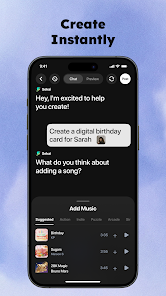
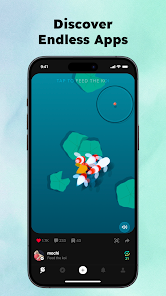
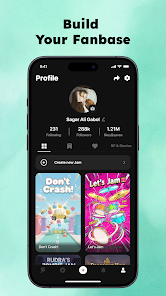
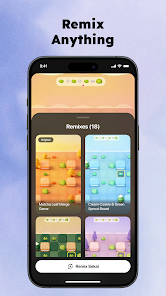
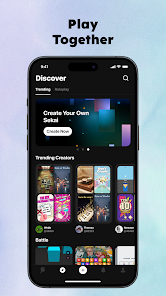
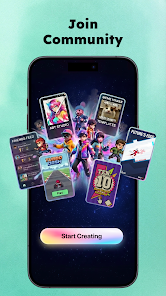

Information
- Category: Entertainment
- Price: free
- Age Rating: Teen
- Available on: /
- Developer: Sekai
- Updated on: Jul 3, 2026
Pros 
-
 Discover endless creativity
 - Easily remix your favorites
- Play with friends in real-time
- Intuitive design for all ages
- Share your creations globally
Cons 
-
 Limited user base growth
 - Complex interface for newbies
- Inconsistent performance issues
- Lack of diverse content options
- Frequent bugs and glitches
Get Installation Details  Google Play
  App Store
Google Play App Store User Reviews
(26.4K Reviews) Blayz Jr (BlayzJr)2025/07/19
Not bad, but not perfect. Pros: It's completely free, the bots are pretty smart, and the avatar image generation is solid. Cons: Can't edit messages, can't edit your own bots after you make them, voices either sound weird or don't play at all, and most bots have a set roll for you so you can't chat as yourself or your own character (that's mostly an issue with other users, not the app).
- Sam Pope2026/06/28
Great, so far, I can make games very easily. However, I am currently experiencing a glitch where every game I play or even just pass over automatically gets liked, not to mention it, but I am currently unable to receive notifications for most things EDIT: Also the wifi isn't working even though I am at full Wifi if you understand that
- Trevor Miller entertainment2026/06/26
I fixed the previous problem (It turns out I was on roleplay instead of stories). but Now I've run into the problem of I lost the ability to add voices to characters and you guys updated it so I can't edit my characters. that last one is a actual problem that first one is just a I don't know what's going on so I feel like it should be brought up in a review type thing.
- josh bean2026/05/29
I'm trying to get a story to load.. but it basically stops just after creating it, characters picked and all that jazz, story loads in, or I add to an existing one, and it just sits and constantly loads. Everything else seems to work fine, already cleared caches and reinstalled several times already... full bars on internet. did a bit of experimenting and can't think of anything else to get it working again. was really enjoying the feature otherwise.
- shameka gray2026/04/30
Love how you can report bugs if a game doesn't work. I love the imput images. Just wish you can add your own stuff. Like when customizing the game. Not only with images and maybe pick different game styles, based on the game. (Like example: Make your own 3D characters, homes, etc)*
Review Source: Google Play store public user reviews.
FAQ
Can I submit suggestions or feedback to Sekai: Create · Remix · Play?
Yes, users can submit feedback and suggestions through the app's support section or website.
Does Sekai: Create · Remix · Play collect my personal data?
Yes, Sekai collects personal data to enhance user experience, but it adheres to privacy regulations.
Does Sekai: Create · Remix · Play support offline use?
Yes, Sekai allows some features to be used offline, but full functionality requires an internet connection.
How do I cancel my Sekai: Create · Remix · Play subscription?
You can cancel your subscription through your account settings in the app or via the app store.
How much does a subscription to Sekai: Create · Remix · Play cost?
Subscription costs vary based on the plan chosen, typically starting at a low monthly fee.
How to use Sekai: Create · Remix · Play
How can I contact customer service for the Sekai app?
You can reach customer service through the app's settings or visit the official website for support options.
How do I log in to my Sekai account?
Open the app, tap on the login button, and enter your credentials or use a linked social media account.
Is there a way to activate my Sekai account?
If activation is required, check your email for a confirmation link after registration, and follow the instructions provided.
What is the customer number for Sekai support?
The customer number is typically found in the app's help section or on the official website.
Similar Apps















You May Like

Pluto TV: Watch Free Movies/TV
Pluto, Inc.
3.7

NetShort - Popular Dramas & TV
NETSTORY PTE. LTD.
4.2

Hulu
Disney
4.5

MX Player
Amazon Mobile LLC
4.2

Newsmax
Newsmax Media
3.2
JustPlay - Earn or Donate
JustPlay GmbH
4.5

Audiomack: Music Downloader
Audiomack Music Apps
4.8

Plex: Stream Movies & TV
Plex, Inc.
3.7

YouTube Music
Google LLC
4.6

Wither Storm Mod for Minecraft
Race Car Entertainment
4.2

Plezy for Plex
edde746
4.4

MyChar: Chat with AI Friends
Riser Yazılım
4.4