
 Home
Home  Apps
Apps  Games
Games  Windows
  Terms of Service
  Cookies & Privacy Policy
  About us
US Public Weather

 3.7
3.7 100,000+ Downloads
2.30 Version
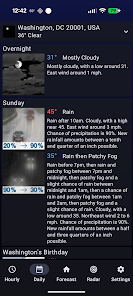
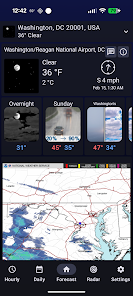
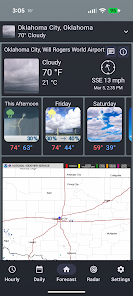
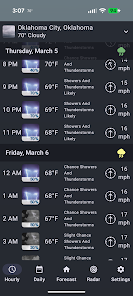
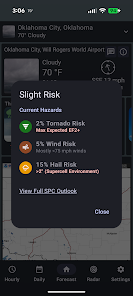
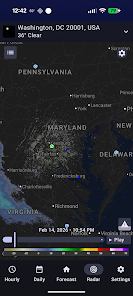
Information
- Category: Weather
- Price: free
- Age Rating: Everyone
- Available on: /
- Developer: MeteorologyMan
- Updated on: Apr 26, 2026
Pros 
-
 Stay updated with real-time forecasts
 - Access detailed radar maps easily
- Receive severe weather alerts instantly
- Customize notifications for your area
- User-friendly interface for all ages
Cons 
-
 Limited local coverage
 - Inaccurate forecasts sometimes
- Cluttered user interface
- Slow loading times reported
- Lack of customization options
Get Installation Details  Google Play
  App Store
Google Play App Store User Reviews
(438 Reviews) B Lee2026/04/21
The good: The data seems to be accurate most of the time. No ads. Simple app with good metrics like hourly, daily, and radar. I do like how they have both Fahrenheit and Celsius listed. I want to know both. The not so good: Getting some odd data. Temperatures can lag some, but not a deal breaker. Also, said there was rain in my area several times when there was not a cloud in the sky. 🤪😂
- B Harton2023/09/10
Like the functions but can't make it save locations - very annoying - originally I thought that it cleared memory of saved locations each day, but now it seems to be doing it randomly. I save a location, even if I flag it as a favorite, it is still deleted, sometimes each time I open the app, sometimes it let's me open several times in a row. I don't believe I have ever seen it remember my location on the first use in a day.
- Brandon Pummill2023/06/05
This app runs great and is easy to use. It's easy to get a glimpse of the weather and future weather. And the radar runs great as well, but it is buggy with the UI elements. I'll give it a five-star once the UI for the radar is fixed. (When trying to change the layers or what type of radar you wanted to see, it wouldn't let you. It just refreshed the radar but kept the settings the same.)
- Layne Knight2023/06/21
Edit: By bouncing, I mean that after it loads it will jump around in non-sequential time. For example, it will show images at 5:00, 5:30, 5:40, 5:10, 5:50, 5:00, 5:20, etc. Just randomly bouncing among the times in the range. Happens every time, and especially if I resize the scale on the map or change settings (image source, etc.). Good, clean, concise app. Too bad the radar doesn't work. It bounces randomly between times, crashes often, etc. Using on a Pixel.
- ll2j2025/03/08
So glad I found this app. Simple interface with straightforward information about the weather. So much better than the other options out there that give you the same information from the same source while layering it under 1000 ads. Just the weather from the government science who study and model it. What more do you need? It even has a conversion button for Celsius!!
Review Source: Google Play store public user reviews.
How to use US Public Weather
Can I change my account settings in the US Public Weather app?
Yes, log in, go to 'Settings', and you can update your preferences and account information.
How can I contact customer service for the US Public Weather app?
You can reach customer service by calling 1-800-555-0199 or emailing support
How can I delete my account on the US Public Weather app?
To delete your account, contact customer service at support
How do I log in to the US Public Weather app?
Open the app, tap on 'Log In', enter your registered email and password, then tap 'Submit'.
How do I reset my password for the US Public Weather app?
Tap on 'Forgot Password?' on the login screen, enter your email, and follow the instructions sent to your inbox.
What's New
- Bugfixes for convective outlooks
Similar Apps












You May Like
The Weather Channel - Radar
The Weather Channel
4.7
Live Weather: Daily Forecast
WINDWAVE LIMITED
4.6

Weather Puppy - App & Widget
Weather Creative Inc.
4.9

Storm Shield
Mosaic Srl
3.3
OpenSnow
Cloudnine Weather, Inc.
4.1
Noyes' 1DegreeOutside Weather
1DEGREEOUTSIDE, INC.
4.9
Drive Weather With Live Radar
Concept Elements Inc
4.5

MyShake Earthquake Alerts
UC Berkeley Seismological Laboratory
3.8

TheFrog: Weather app
giovesoft
4.5
Funny Weather: Rude Forecast
epsilon ventures LLC
4.3

Dronecast - Weather & Fly Map
Dronecast
4.5

Fishing forecast
MaxSaur
4.4