
 Home
Home  Apps
Apps  Games
Games  Windows
  Terms of Service
  Cookies & Privacy Policy
  About us
Fine Lock (only for Samsung)

 4.6
4.6 10,000,000+ Downloads
/ Version
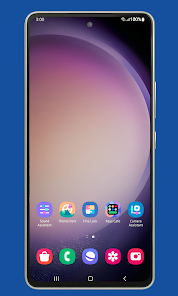
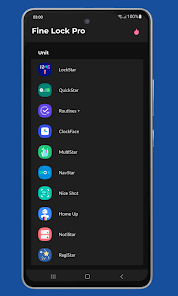
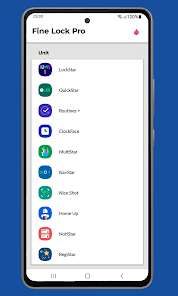
Information
- Category: Personalization
- Price: free
- Age Rating: Everyone
- Available on: /
- Developer: YUH APPS
- Updated on: Sep 4, 2025
Pros 
-
 Fine Lock enhances your Samsung experience with its unique features.
 - Customize your lock screen easily!
- Access apps with a simple tap!
- Secure your device with ease!
- Enjoy a user-friendly interface!
- Boost productivity with shortcuts!
Cons 
-
 Fine Lock is a useful app for Samsung users, but it does have some disadvantages. Here are a few to consider:
Limited to Samsung devices
Fine Lock is a useful app for Samsung users, but it does have some disadvantages. Here are a few to consider:
Limited to Samsung devices - May not support all features
- Frequent updates can be buggy
- User interface can be confusing
- Requires additional setup time
Get Installation Details  Google Play
  App Store
Google Play App Store User Reviews
(59.6K Reviews) Alyssa Liddy2022/04/06
It is a cool app but I was ready to go back to my phone's original look so I deleted the apps thinking it would change. Nope, I reset my phone settings and it only took away half of the changes I made through 'Theme Park' and 'KeysCafe'. My keyboard is still different as is the text color of my phone and the bubbles of my messages. Oh, and there is no trace of those apps being on my phone and I cannot find them in the app store again. I cannot figure out how to get rid of those settings I made.
- Alibi2025/11/01
I wish I had downloaded this sooner. It's a gamechanger for getting a phone to meet your needs. Goodlock isn't fully supported by my device, but this makes it work perfectly. Yes, as with any program using APK modules, you can't download them in-app, but that is no fault of Fine Lock and is up to Google Play's policies. However, the app is far easier to navigate and use than downloading the modules on your own. An excellent tool every Galaxy user should have.
- Gabriel Jasmer2023/05/24
Love the app, but every time i upgrade my phone i need to redownload, but the download process is very sus. It's free, but asks to enter credit card info to Install. Takes you to a 3rd party site to download apps rather than being able to download them directly in the Fine Lock app. Once the process is easier I'd highly recommend this to anyone. Verified by Samsung or not you shouldn't have to go to a 3rd party site to download Samsung apps.
- Dara2024/04/03
Good product which tailors your phone to your tastes. Recommended. Update: I use one hand operation across all apps, but in relation to Chrome, I use it to go back, forward, to jump to the previous app, to close the app, to jump immediately to the search bar, to open recent apps. However, when you want to close a tab with a group, you have to press the square at the top of the screen and then close it. It's the only time I have to move my thumbs above the midway point of the phone.
- Timofej Iriminku2023/07/26
This app is awesome. I have customized my Samsung, and it looks great, especially the keyboard. Finally, I could change the keyboard without it removing extra symbols. I love how you can customize a lot, but my android 13 can't open QuickStar and the thermal guardian. Everything on the NotiStar app is blocked, and there is no way for me to give it any permission. Overall, the app is great, and I love it.
Review Source: Google Play store public user reviews.
How to use Fine Lock (only for Samsung)
How can I contact customer service for the Fine Lock app?
You can reach Fine Lock customer service through the app's support section or by visiting their official website for contact details.
How do I activate Fine Lock on my Samsung device?
To activate Fine Lock, download the app, grant necessary permissions, and follow the on-screen instructions to set it up.
How do I log in to the Fine Lock app?
Open the app and enter your Samsung account credentials to log in. If you don’t have an account, you can create one within the app.
What is the customer number for Fine Lock support?
Fine Lock does not have a specific customer number; support is primarily provided through the app and online resources.
What's New
- Various bug fixes.
Similar Apps










You May Like
Zipper Lock Screen: Zip Theme
Amazic Fun Hub
4.6
Themely - Icons & Widgets
Animoji Phone X & Emoji Maker Develop Team
4.8
Hole U Can Eat Home App
Hadiz Studio
4.2

USB Screen Share - Phone to TV
Battery Stats Saver
3.8
Wasteland Gear 12H/24H
Akisman001
4.4

VibeWalls-Live Wallpaper&Theme
Hong Kong Mishi Technology Co., Limited
5.0
SamWatch PointColor 6 2024
Samtree

Projectivy Launcher
Spocky
4.5
Mico - Widget & Live Wallpaper
MICO LTD
4.5

Material You Widgets
AppsLab Co.
4.5

Illustration Wall
Origin DevTh

Gallerie Wallpapers
Sibelius Studios LLC
4.7