
 Home
Home  Apps
Apps  Games
Games  Windows
  Terms of Service
  Cookies & Privacy Policy
  About us
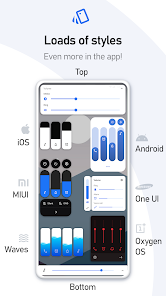
Volume Styles - Custom control

 4.5
4.5 10,000,000+ Downloads
5.1.3 Version
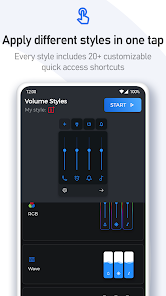
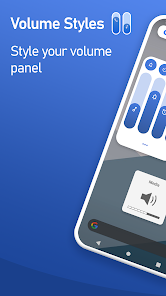
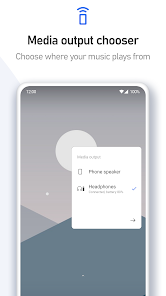
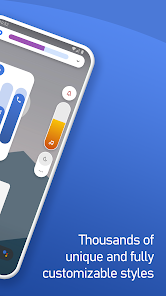
Information
- Category: Personalization
- Price: free
- Age Rating: Everyone
- Available on: /
- Developer: Tom Bayley
- Updated on: Jun 11, 2026
Pros 
-
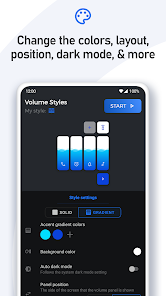
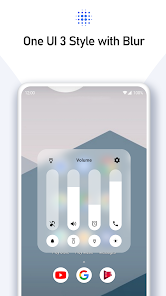
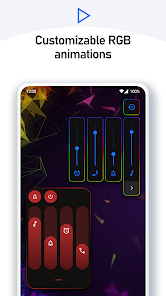
 Experience personalized volume control
 - Easily switch between styles
- Intuitive and user-friendly design
- Customize settings to your needs
- Seamless integration with apps
Cons 
-
 Limited customization options
 - May not support all devices
- Potential for user confusion
- Inconsistent user experience
- Performance issues on older models
Get Installation Details  Google Play
  App Store
Google Play App Store User Reviews
(158K Reviews) Leigh-Anne Clabby2025/09/16
I love it when it works, but it keeps crashing/getting turned off multiple times a day. I like being able to easily change whether my phone is on ringer, silent, or do not disturb, and individually controlling the media volume, alarm, and ringer. I also like the customize options. I just wish I didn't have to keep going in the settings and restarting it.
- Francis Nguyen2022/10/01
Love the app, when it doesn't crash. I'd rate it 5 stars otherwise, since I definitely triple checked that I have battery optimization disabled. Sometimes the app will go a week without crashing, other times once a day. Another annoying thing is having to uncheck and recheck the permissions settings after the app crashes, since it seems to think I turned it off.
- G G2020/05/26
It's good, no ads and does everything as advertised. However, there is a problem with it interacting with headphones. It doesn't allow you to go past the volume where a prompt shows up, and instead of showing you a "this may be damaging" prompt it just doesnt go any higher. I don't seem to be able to change this setting.. Could this be helped?
- Ty2021/01/03
I love the app but for some reason I have a hard time with getting the casting volume to work properly. It either doesn't work at all or it will continue to try and adjust the casting volume even if I've stopped casting. Update: tried the app again after several months but the issue noted before still occurs. I should have to stop and start the app to change the volume on my device when I'm done streaming.
- Samantha Goodman2021/01/27
Here's the thing. I give this app an A+. Is it PERFECT? No. Is it flawless? No. But it is damn close to both. BUY IT. Because even as someone who usually searches for apks of pro versions and is broke, I purchased this without hesitation as it looked amaaazing. I can tell you, they could charge way more for it. The paid for version has way more fun options to do with styling, colors, and settings. You won't regret it. It also erases what you would call a glitch. It works almost seemlessly. ♥
Review Source: Google Play store public user reviews.
FAQ
Can I submit suggestions or feedback to Volume Styles - Custom control app?
Yes, users can submit feedback and suggestions through the app's support section.
Does Volume Styles - Custom control app collect my personal data?
No, Volume Styles does not collect personal data from its users.
Does Volume Styles - Custom control app support offline use?
Yes, Volume Styles can be used offline without any internet connection.
How do I cancel my Volume Styles - Custom control app subscription?
You can cancel your subscription through your device's app store settings.
How much does a subscription to Volume Styles - Custom control app cost?
The app offers a premium subscription, typically priced at a few dollars per month.
How to use Volume Styles - Custom control
Can I change my customer number for Volume Styles?
Customer numbers are unique and cannot be changed. If you need assistance, contact customer support.
How can I contact customer service for the Volume Styles app?
You can reach customer service through the app's support section or by emailing support
How can I provide feedback about the Volume Styles app?
You can submit feedback through the app's feedback section or email us directly at feedback
How do I log in to my Volume Styles account?
Open the app, tap on the login button, and enter your registered email and password.
How do I reset my password for Volume Styles?
Use the "Forgot Password?" link on the login page to receive a reset link via email.
What's New
- Improved translationsAdded haptic feedback option for volume changes — enable it in the Advanced settingsBug fixes and enhancements
Similar Apps












You May Like
Zipper Lock Screen: Zip Theme
Amazic Fun Hub
4.6
Themely - Icons & Widgets
Animoji Phone X & Emoji Maker Develop Team
4.8
Hole U Can Eat Home App
Hadiz Studio
4.2
USB Screen Share - Phone to TV
Battery Stats Saver
3.8
Wasteland Gear 12H/24H
Akisman001
4.4

VibeWalls-Live Wallpaper&Theme
Hong Kong Mishi Technology Co., Limited
5.0
SamWatch PointColor 6 2024
Samtree

Projectivy Launcher
Spocky
4.5
Mico - Widget & Live Wallpaper
MICO LTD
4.5

Material You Widgets
AppsLab Co.
4.5

Illustration Wall
Origin DevTh

Gallerie Wallpapers
Sibelius Studios LLC
4.7