
 Home
Home  Apps
Apps  Games
Games  Windows
  Terms of Service
  Cookies & Privacy Policy
  About us
 Other Versions of 3D Valentine Hearts WatchFace
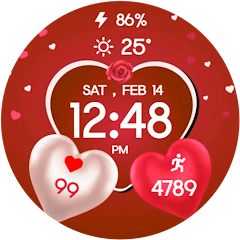
3D Valentine Hearts WatchFace


You are going to be redirected to the official website to finish the download when you click these buttons above.
FAQ
Can I customize the 3D Valentine Hearts WatchFace?
Yes, the app allows for various customization options, such as changing the colors of the hearts, adjusting the background, and setting different time formats. This way, you can personalize the watch face to match your style or mood.
Can I use the 3D Valentine Hearts WatchFace app year-round?
Absolutely! While the design is perfect for Valentine's Day, many users enjoy using it throughout the year for its aesthetic appeal and unique look.
Does the 3D Valentine Hearts WatchFace app drain the battery quickly?
While the app features animated elements, it is designed to be energy-efficient. However, continuous use of animated watch faces may still lead to a slight increase in battery consumption compared to static watch faces.
How do I install the 3D Valentine Hearts WatchFace app?
You can install the app by visiting the Google Play Store on your Android device, searching for "3D Valentine Hearts WatchFace," and tapping the install button. Once downloaded, you can set it as your watch face through your smartwatch settings.
Is the 3D Valentine Hearts WatchFace compatible with all smartwatches?
The app is primarily designed for Android smartwatches that support Wear OS. It may not be compatible with iOS devices or other operating systems, so it's best to check the app's requirements before downloading.
Similar Apps
Emoji Battery: Widget Bar
Personalization
4.1

The Arcade · Game Hub Launcher
Personalization
4.5
Fine Lock (only for Samsung)
Personalization
4.5
Volume Styles - Custom control
Personalization
4.5
Waves
Personalization
0
Photo Prints Now: CVS Photo
Personalization
4.8
Transparent Wallpaper
Personalization
4.6
Lively Lock Screen Wallpapers
Personalization
4
Candy Race Launcher
Personalization
4.5
Trending Apps

Microsoft Word App
Productivity
4.8
Microsoft Word: Edit Documents
Productivity
4.8

McDonald's
Food & Drink
2.8

Cleaner Launcher for Android
Tools
4.3

Upside: Cash Back - Gas & Food
Travel & Local
4.5

KJV Bible: Audio+Verse
Books & Reference
4.5

Google Gemini
others
4.6

Threads
Social
4

T-Mobile Tuesdays
Lifestyle
4.7
Top Downloads
Zipper Lock Screen: Zip Theme
Amazic Fun Hub
4.3
Themely - Icons & Widgets
Animoji Phone X & Emoji Maker Develop Team
4.7
Hole U Can Eat Home App
Hadiz Studio
4.4
USB Screen Share - Phone to TV
Battery Stats Saver
3.8
Wasteland Gear 12H/24H
Akisman001
4.4
VibeWalls-Live Wallpaper&Theme
Hong Kong Mishi Technology Co., Limited
4.4
SamWatch PointColor 6 2024
Samtree

Projectivy Launcher
Spocky
4.6
Mico - Widget & Live Wallpaper
MICO LTD
4.4
Material You Widgets
AppsLab Co.
4.5

Illustration Wall
Origin DevTh

Gallerie Wallpapers
Sibelius Studios LLC
4.6