
 Home
Home  Apps
Apps  Games
Games  Windows
  Terms of Service
  Cookies & Privacy Policy
  About us
Banfield Pet Hospital

 4.7
4.7 500,000+ Downloads
5.4.1 Version
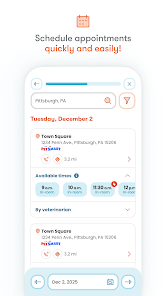
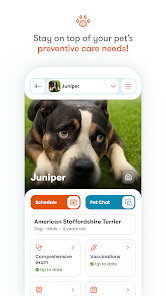
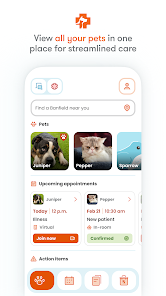
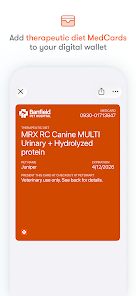
Information
- Category: Medical
- Price: free
- Age Rating: Everyone
- Available on: /
- Developer: Banfield Pet Hospital an Affiliate of Mars, Inc.
- Updated on: Jun 24, 2026
Pros 
-
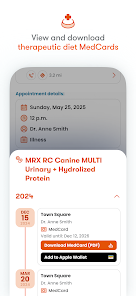
 Stay connected with your vet
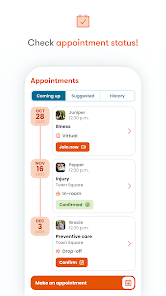
 - Book appointments easily
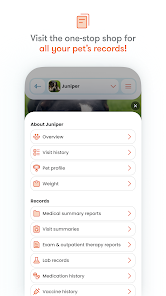
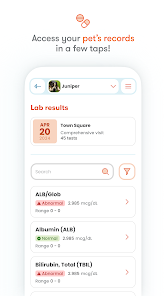
- Access pet health records
- Receive medication reminders
- Find nearby Banfield locations
Cons 
-
 Limited appointment options
 - User interface can be confusing
- Slow loading times reported
- Lack of comprehensive info
- Inconsistent customer support
Get Installation Details  Google Play
  App Store
Google Play App Store User Reviews
(21.8K Reviews) Anke Farrar2026/06/17
The app is bugging. When opening it, it loads only certain information. Right now I can see that my pet has an upcoming event, but everything else is "loadiing". When trying to make another appointment, my pet doesn't show at all. Health records don't always show either. At this point, I'll have to contact my vet for any information, which makes the app obsolete.
- Julia Pohl2026/02/14
App was easier to use before the recent update. It is very difficult to distinguish between the "contact info" button and the "schedule" button for a given location. (It is not clear that they are separate buttons.) Load times are very poor in the app even when other apps/web browsers are having no issue. Also, the app used to be a convenient way to keep track of pet Bdays as they displayed on each pet's main page, but now you have to go 3 slow-loading steps deep in their profile to find it.
- Deanna Battaglia2026/03/14
its so slow and scheduling appointments takes a million years. easier to just wait until they're open and call the clinic yourself. with the new system update, you don't have access to all your records anymore. there's a place you can "request" them but its been weeks and that's never worked for me. yet again having to call the clinic. the app/website was already slow before. now its even worse. doesn't even pull up your preferred store when scheduling appts, and searching rarely works right
- Brooke Burrows2026/01/28
This is beyond frustrating. The app repeatedly tells me to update and directs me to the App Store, but when I open the App Store, there is no update available. I close everything, try again, and get the exact same result. At that point, FITFO, standard IT troubleshooting — uninstall and reinstall. After reinstalling, I opened the app… and nothing changed. Same screen, same issue. I genuinely don’t understand how every Banfield system manages to be this unreliable. In person and on the phone.
- Ashlie Hilbert2026/01/04
This app is terrible. It doesn't allow you to view any of your pets actual information. I've read many reviews on Google play all saying similar. the responses about reaching out to tech support/calling the phone number are clearly not getting anyone anywhere. The entire database needs an overhaul so people can see their pet's information without having to call into the office where the staff is more than likely quite busy.
Review Source: Google Play store public user reviews.
How to use Banfield Pet Hospital
How can I contact customer service for the Banfield Pet Hospital app?
You can contact customer service through the app by navigating to the "Help" section or by calling their support number listed on the website.
How do I activate my Banfield Pet Hospital app account?
To activate your account, download the app, select "Create Account," and follow the prompts to enter your pet's information and your details.
How do I log in to the Banfield Pet Hospital app?
Open the app, enter your email and password associated with your account, and tap "Log In." If you forget your password, use the "Forgot Password?" link.
What is the customer number for Banfield Pet Hospital?
The customer number can be found on your account profile within the app or on the Banfield website under the contact section.
What's New
- New in this release: Easily manage your pet’s wellness plan right from the app.You can now:· Manage auto-renewal preferences· View wellness plan payment history· View scheduled payments for a monthly wellness plan· Make payments securely· Manage plan payment methods
Similar Apps















You May Like

FollowMyHealth®
Veradigm LLC
4.8

VisualDx
VisualDx
3.9

Twin Health
Twin Health
4.7

myPatientVisit Portal
Nextech Systems, LLC
3.4

Hearing Aid APP:PETRALEX 4 EAR
Algorithm electronics
4.5

ERG for Android
PHMSA
4.2

EndeavorOTC®: Outplay ADHD
Akili Interactive Labs, Inc.
3.4

DSM-5-TR® Diagnostic Criteria
American Psychiatric Association
4.5

Complete Anatomy
3D4Medical from Elsevier
3.4

Blood Pressure Tracker
aadhk
4.6

ARO 2026
MetaPort Systems, LLC

Accredo
Accredo Health Group, Inc
4.7