
 Home
Home  Apps
Apps  Games
Games  Windows
  Terms of Service
  Cookies & Privacy Policy
  About us
Oticon Companion

 4.4
4.4 1,000,000+ Downloads
1.7.0 Version
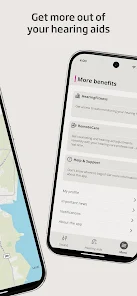
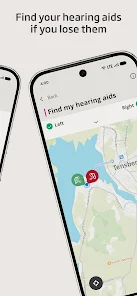
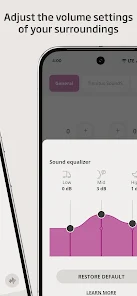
Information
- Category: Medical
- Price: free
- Age Rating: Everyone
- Available on: /
- Developer: Oticon A/S
- Updated on: May 18, 2026
Pros 
-
 Stay connected with loved ones
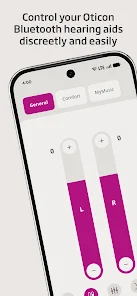
 - Easily adjust hearing settings
- Access real-time sound control
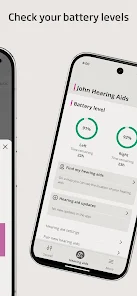
- Track hearing aid battery life
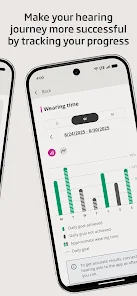
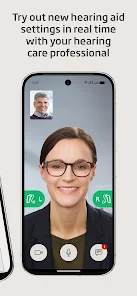
- Receive personalized support tips
Cons 
-
 Limited compatibility issues
 - User interface can be confusing
- Occasional connectivity drops
- Requires frequent updates
- Battery drain on devices
Get Installation Details  Google Play
  App Store
Google Play App Store User Reviews
(17.4K Reviews) Katie Farmer2025/10/26
The app is very straightforward and easy to use. The only major problem is that I have to uninstall and reinstall about every 2 to 3 months because the app just stops working which is difficult because then I have to reconnect it with my hearing aids in the charger. So if this happens at work, I'm pretty much stuck without being able to change any settings. additionally, it will just randomly disconnect from my hearing aids for a few seconds, which is odd.
- Jim Adam2026/07/01
Good app. Everything is straightforward and easy to use. Has a nice notifications mode that allows instant adjustment. My only complaint is that lately the right side volume in the standard mode is offset from the left side - it starts at a slightly higher bar and will go up to +4, but the left side only goes to +3. Doesn't happen in the one custom mode I have set up. Eventually, I'll ask the audiologist about it, but I suspect if I uninstalled and reinstalled it, that would go away.
- John Luke Mills2026/06/09
I generally like the app with my Intent 1 hearing aids, but there's a lot of room for improvement. I am using them with a pixel 10 phone. The most aggravating issues are about Auracast. In particular it is impossible to disconnect from a broadcast. When you press the disconnect button there is a quarter second flash of a different screen. It is way to fast to read any of it, never mind trying to press any controls. I have to reboot my phone or wait for the broadcast to shutdown.
- Michelle Clark2026/05/30
More and more, I have to uninstall then reinstall the app or the hearing aids can't be monitored from my phone. Also, my phone wants to the app in deep sleep because of the power usage. I don't have major hearing loss, mostly tinnitus and only use the aids in the evening. after I got them, THEN I was shown the docking station. worst design ever and horrible for traveling. after all this, I may remove one star!
- Jon H2026/06/16
Great app. The functionality it unlocks with my Oticon Intent hearing aids is amazing. The only issue I have is that it will on occasion stop sounding notifications from my phone. Not sure if this has to do with muting my phone and unmuting, or what. When this happens, I can normally get the notification tones back by cycling my phone through vibrate, silent and back to sound
Review Source: Google Play store public user reviews.
FAQ
Can I submit suggestions or feedback to the Oticon Companion app?
Yes, users can submit feedback and suggestions through the app or the Oticon website to help improve future updates.
Does the Oticon Companion app collect my personal data?
The app may collect certain data to improve user experience, but it adheres to privacy regulations and user consent.
Does the Oticon Companion app support offline use?
Yes, the app offers some features that can be accessed offline, but full functionality may require an internet connection.
How do I cancel my Oticon Companion app subscription?
You can cancel your subscription through your app store account settings or within the app's subscription management section.
How much does a subscription to the Oticon Companion app cost?
Subscription costs may vary based on features and region; check the app for specific pricing details.
How to use Oticon Companion
Can I use the Oticon Companion app without an account?
No, you must create an account to use the app and access its features.
How can I contact customer service for the Oticon Companion app?
You can contact Oticon customer service through their official website or by calling their support number listed in the app.
How can I provide feedback about the Oticon Companion app?
You can provide feedback through the app's settings menu or by contacting customer support directly.
How do I log in to the Oticon Companion app?
Open the app and enter your registered email and password. If you don’t have an account, you can create one directly in the app.
How do I reset my password for the Oticon Companion app?
On the login screen, click "Forgot Password?" and follow the prompts to reset your password via email.
What's New
- To improve your experience, we regularly update the app to make it more reliable and easier to use. In this update, we have made improvements and bug fixes to make the app more stable.
Similar Apps














You May Like

FollowMyHealth®
Veradigm LLC
4.8

VisualDx
VisualDx
3.9

Twin Health
Twin Health
4.7

myPatientVisit Portal
Nextech Systems, LLC
3.4

Hearing Aid APP:PETRALEX 4 EAR
Algorithm electronics
4.5

ERG for Android
PHMSA
4.2

EndeavorOTC®: Outplay ADHD
Akili Interactive Labs, Inc.
3.4

DSM-5-TR® Diagnostic Criteria
American Psychiatric Association
4.5

Complete Anatomy
3D4Medical from Elsevier
3.4

Blood Pressure Tracker
aadhk
4.6

ARO 2026
MetaPort Systems, LLC

Accredo
Accredo Health Group, Inc
4.7