
 Home
Home  Apps
Apps  Games
Games  Windows
  Terms of Service
  Cookies & Privacy Policy
  About us
myVCA

 4.9
4.9 500,000+ Downloads
5.10.475 Version
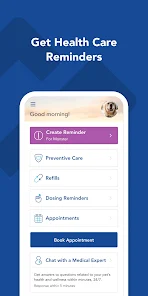
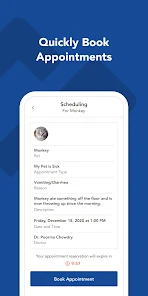
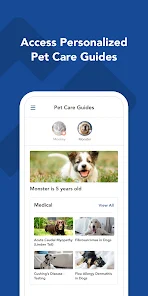
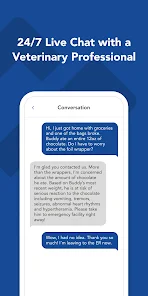

Information
- Category: Medical
- Price: free
- Age Rating: Everyone
- Available on: /
- Developer: VCA, Inc.
- Updated on: Jun 24, 2026
Pros 
-
 Discover the myVCA app's benefits:
 - Streamlined pet health records
- Easy appointment scheduling
- Access to expert veterinary advice
- Personalized pet care reminders
- User-friendly interface design
Cons 
-
 Limited customization options
 - Occasional bugs and glitches
- Steep learning curve for users
- Inconsistent customer support
- Requires constant internet access
Get Installation Details  Google Play
  App Store
Google Play App Store User Reviews
(8.37K Reviews) Korrine H2026/02/24
I can get basic things done on the app. If you need to do more you're out of luck. BE AWARE they will link back, keep and deliver to your old address indefinitely. It will remain embedded in their system in unknown places, what, forever? The search option is annoying. It brings many items up, not just yours.
- Kae Reichgott2024/07/15
Buggy and slow when it works. While you can eventually get what you need, it's painfully slow even on high speed connections. I just found out that all data for the app is stored locally at the clinic and there is NO offsite backup (per the call center). So in extended power outages, inclement weather, floods, etc the app is unusable AND your pets' records cannot be accessed to take to an alternate provider. It also means they can't notify you in any way that they are closed, apparently.
- Michael Radovich2024/06/19
I've subscribed to Careclub for about 10 years, and their service has gotten significantly worse. My latest issue, the auto-renew button on the app doesn't work. When my policy was set to renew this year, they signed me up for a lesser service that I did not agree or consent to that no longer included dental care. I received no emails or phone calls about the change, and the app doesn't show me what my current subscription level is or what other subscription options are available. AVOID!!
- Stella2020/07/21
The app won't load at all. It notifies me of my pets appointment and asks me to rate the hospital but I can't see or do anything beyond looking at the "something went wrong page". I've reached out twice, today being the 2nd time, and no one's gotten back to me. I used the report button on the error page so I'll my phones relevant system info should be provided. Update 7/21: IT support has been in contact with me and has been trying several angles. Updated for excellent service!
- Jessica Crawford2024/10/25
Trying to use Vetsource on the app can run incredibly slowly, orders can take a really long time to ship, and there have been multiple times when I've had problems updating my payment method. The card information is correct on my end, but I continue to receive emails saying I need to update it until finally the order got automatically canceled. I started a new order, and now there are TWO active orders and I'm being charged for two times the items I actually need.
Review Source: Google Play store public user reviews.
How to use myVCA
How can I contact Customer Service for the myVCA app?
You can contact Customer Service through the app's help section or by calling the support number listed on the website.
How do I activate myVCA app if necessary?
To activate, download the app, open it, and follow the on-screen instructions to create an account or enter your activation code.
How do I log in to the myVCA app?
Open the app, enter your registered email and password, then tap 'Log In' to access your account.
What is the Customer Number for myVCA app support?
The Customer Number can be found in the app under the 'Account' section or on the official website.
What's New
- This release contains minor performance improvements and bug fixes. As always, please reach out to [email protected] with any feedback or questions.
Similar Apps















You May Like

FollowMyHealth®
Veradigm LLC
4.8

VisualDx
VisualDx
3.9

Twin Health
Twin Health
4.7

myPatientVisit Portal
Nextech Systems, LLC
3.4

Hearing Aid APP:PETRALEX 4 EAR
Algorithm electronics
4.5

ERG for Android
PHMSA
4.2

EndeavorOTC®: Outplay ADHD
Akili Interactive Labs, Inc.
3.4

DSM-5-TR® Diagnostic Criteria
American Psychiatric Association
4.5

Complete Anatomy
3D4Medical from Elsevier
3.4

Blood Pressure Tracker
aadhk
4.6

ARO 2026
MetaPort Systems, LLC

Accredo
Accredo Health Group, Inc
4.7