
 Home
Home  Apps
Apps  Games
Games  Windows
  Terms of Service
  Cookies & Privacy Policy
  About us
Draw with AR: Trace and Sketch

 4.6
4.6 1,000,000+ Downloads
1.2.6 Version
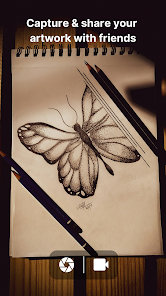
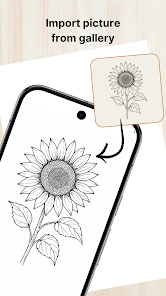
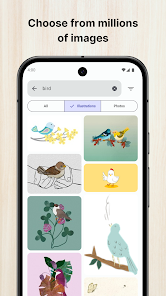
Information
- Category: Art & Design
- Price: free
- Age Rating: Everyone
- Available on: /
- Developer: Veewa Labs
- Updated on: Feb 25, 2026
Pros 
-
 Unleash your creativity easily!
 - Transform your sketches into AR!
- Trace over real-world objects!
- Share your art with friends fast!
- User-friendly interface for all!
Cons 
-
 Limited drawing tools available
 - Steep learning curve for beginners
- Requires a stable internet connection
- In-app purchases can add up
- Occasional bugs and glitches present
Get Installation Details  Google Play
  App Store
Google Play App Store User Reviews
(10.9K Reviews) Simone Siasico2026/04/26
I really miss Tools like this, it just goes straight to the point, its really refreshing to see an app that just does what it does with a simple click, when I want to trace a picture, it doesn't blast me with ads and subscriptions it just goes "do your thing". Its a simple app, the search bar is to be honest "meh", fortunately i get my references from my gallery. Other than that, I dont have much to say. -simple -straight to the point -loved it
- maria lizbeth2026/04/21
It's alright I guess. I mostly use this app for pose references I find on Pinterest but I don't like how it has so much ai generated slop.Like bro, could you not find someone to draw a few simple pictures.Imagine wasting all that water for pictures that don't even look good. But anyways, it's not like anyone's gonna listen to me complain about all the ai stuff and ACTUALLY do something about it especially considering the fact that 90% of intern is ai. Like that "Fruit love island" nonsense. 🙄
- V V2026/06/04

This app was well functioning before it got inundated with ads. I understand independent apps need ads to survive, but when back to back long unskippable ads come right after selecting an image for tracing, it's a headache. Because of this, I dread changing an image for tracing. Plus, when you upload the image for tracing, its quality decreases. So you cannot see any details. It's sad to see that this is the condition of a well working app.
- Nathan Sky ID2026/06/21
this application is really good, so I always want to keep drawing. At home I was bored, didn't know what to do, and then I found this application, so I had an activity. Although the phone gets hot quickly and the battery drains due to the camera being active or the screen being too bright, those are the main features of this application, so it's not too much of a problem. And the UI of this application is very simple, not too complicated, not too many features, so it can be used low spec phone.
- Precious Miel Aquino2026/05/08
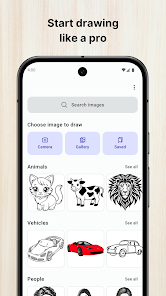
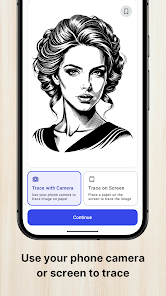
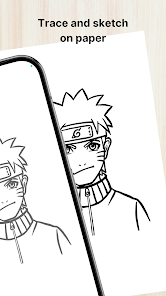
if I could give this ten million I will this app does have ads but it is relatively short,it's really helpful in drawing for my notes and just trying to draw in general. I love the fact that you can use your own photo,used your saved photos and take a picture of what you want to draw,you can even lock the picture in place so it doesn't move which I appreciate,you can also only do the outlines which I personally love and you can mirror it so you can change it if you want it facing left or right
Review Source: Google Play store public user reviews.
How to use Draw with AR: Trace and Sketch
How can I contact customer service for the Draw with AR: Trace and Sketch app?
You can reach customer service through the app's settings or visit our website for support options.
How do I log in to the Draw with AR: Trace and Sketch app?
Open the app, tap on the login option, and enter your credentials or sign in with your social media account.
Is there a way to activate premium features in the app?
Yes, you can activate premium features by purchasing a subscription through the app's settings or the main menu.
What is the customer number for Draw with AR: Trace and Sketch app?
The customer number is typically found in the app's settings or on the official website under contact information.
Similar Apps













You May Like

Learn how to draw - ArtWorkout
ArtWorkout
4.4
SketchPad
Kaffeine Software
4.3

PixAI: AI Anime Art Generator
Mewtant Inc.
4.4
OneUI Fluffy Glass Icons
AppixoStudio
5.0

Nano Banana Pro - NanaAI
DavinciAi Pte. Ltd.
2.7

Movcl: AI Video Creator
Movcl Ltd.
3.0
Liquid Glass 26 Icon Pack
AppixoStudio
3.8
Cartoon OC Maker
Anfona Tech
3.2
Brother Artspira
Brother Industries, Ltd.
3.9
AR Trace Art & Sketch
LeafMotion Software
4.7

AmberPaint - Motion Brush
ALRESPOL
4.0
AI GPT Generator-Text to Video
AI Tech Labs
3.4