
 Home
Home  Apps
Apps  Games
Games  Windows
  Terms of Service
  Cookies & Privacy Policy
  About us
LibreLinkUp

 4.6
4.6 1,000,000+ Downloads
4.17.0 Version
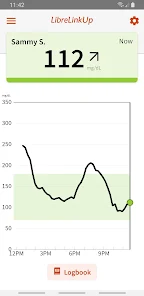

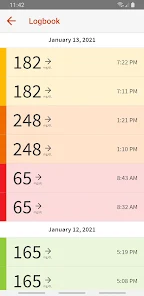
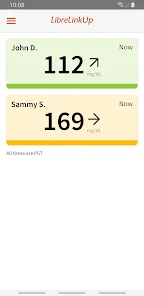
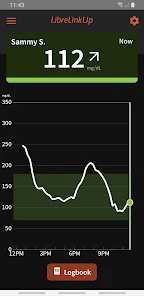
Information
- Category: Medical
- Price: free
- Age Rating: Everyone
- Available on: /
- Developer: Newyu, Inc
- Updated on: May 21, 2026
Pros 
-
 Stay connected with loved ones
 - Share glucose data in real-time
- Receive alerts for high/low levels
- Track trends and insights easily
- User-friendly interface for all
Cons 
-
 Limited compatibility issues
 - Requires constant internet access
- User interface can be confusing
- Data sharing may raise privacy concerns
- Notifications can be overwhelming
Get Installation Details  Google Play
  App Store
Google Play App Store User Reviews
(38.7K Reviews) Ivelinda Olmo2026/05/14
The only really useful feature just got removed! I loved this app because we could move back and forth in the timeline and leave the pointer there until we notated the number. The line was also a bright, solid color which is great for people with vision problems. Now there is this faint line with little numbers. Nope, your previous engineer got it right.
- Kim Abouzeide2026/05/15
I've been trying for days on end to connect via the LibreLinkup - I can't accept the invite! The Accept button presents but wont allow me to choose it. I've troubleshooted every way I know how - Please advise. Beyond that - the Libre 3 constantly goes offline or has erratic readings for a app with such important info, I feel like this has great better. I do enjoy the idea of having a monitor all the time but I have to be able to trust it to work.
- Ha'ani DeBose2026/05/14
I was really debating between two or three stars, but the two is deserved. Since the last update after login it has a pop-up asking to start the tutorial on how to understand the readings and no matter what it's just unresponsive, making it basically unusable. And this app has definitely had it's issues in past versions with data just stopping for hours after a monitor is replaced. I've tried all of the troubleshooting methods and it still hasn't worked. Please fix this.
- Steve Schwink2026/05/15
the app just updated and it sucks! I can't monitor anything there is a prompt in the bottom of my screen that says " start tutorial " it appears to be click able but it isn't. now high alarms are going off no low alarms are going off! I would really appreciate going back to how it was when it actually worked. Also yes I un installed and re in stalled the app with nothing but the same issue!
- Megan Wilson2026/05/25
This app used to be extremely useful and helped me keep track of my mom's glucose levels when I was at home or at work. However, it started getting glitchy and dropping the readings for the last couple of months. Since the update, the app has been horrible. I can't move the along the line as easily anymore, it takes forever to load, and I have to login every time I try to use the app. This app needs to be fixed!!
Review Source: Google Play store public user reviews.
How to use LibreLinkUp
How can I contact customer service for the LibreLinkUp app?
You can contact customer service through the app's help section or visit the official website for support options.
How do I activate my LibreLinkUp account?
Follow the instructions in the app after registration, including verifying your email and linking your Libre system.
How do I log in to the LibreLinkUp app?
Open the app, enter your email and password, then tap 'Log In' to access your account.
Is activation necessary for the LibreLinkUp app?
Yes, you need to activate your account after downloading the app to connect with your Libre system.
What is the customer number for LibreLinkUp support?
The customer number can vary by region; please check the app or the official website for the specific number for your area.
What's New
- A refreshed look and feel to help you find what you need when you need it. Navigate through readings, notifications, and the logbook with ease with bottom bar navigation.
Similar Apps















You May Like

FollowMyHealth®
Veradigm LLC
4.8

VisualDx
VisualDx
3.9

Twin Health
Twin Health
4.7

myPatientVisit Portal
Nextech Systems, LLC
3.4

Hearing Aid APP:PETRALEX 4 EAR
Algorithm electronics
4.5

ERG for Android
PHMSA
4.2

EndeavorOTC®: Outplay ADHD
Akili Interactive Labs, Inc.
3.4

DSM-5-TR® Diagnostic Criteria
American Psychiatric Association
4.5

Complete Anatomy
3D4Medical from Elsevier
3.4

Blood Pressure Tracker
aadhk
4.6

ARO 2026
MetaPort Systems, LLC

Accredo
Accredo Health Group, Inc
4.7