
 Home
Home  Apps
Apps  Games
Games  Windows
  Terms of Service
  Cookies & Privacy Policy
  About us
MyMercy

 3.5
3.5 500,000+ Downloads
11.4.3 Version
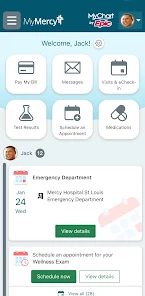
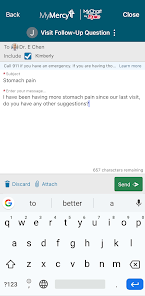
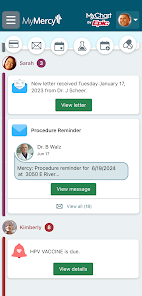
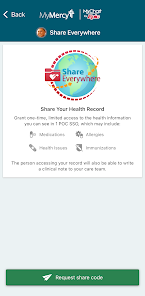
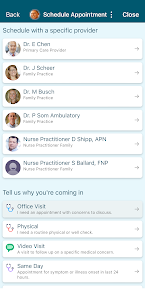
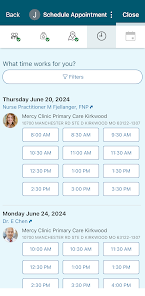
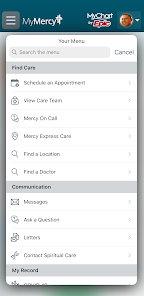
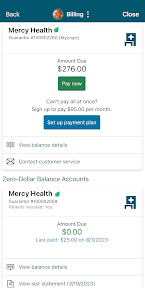
Information
- Category: Medical
- Price: free
- Age Rating: Everyone
- Available on: /
- Developer: Mercy
- Updated on: Mar 10, 2026
Pros 
-
 Stay connected with your care team
 - Access your health records anytime
- Schedule appointments with ease
- Receive medication reminders daily
- Track your wellness goals effortlessly
Cons 
-
 Limited user interface options
 - Inconsistent performance issues
- Lack of offline functionality
- Complex navigation for users
- Delayed customer support response
Get Installation Details  Google Play
  App Store
Google Play App Store User Reviews
(5.68K Reviews) Tyler Fridley2026/06/03
The app works well at a basic level, but features like fingerprint sign in rarely work. It seems like each new wave of updates break something as well. The most recent issue is that the app is telling me that the version I'm using is old but there's 0 updates available, and this has been an issue for close to a week (tried uninstalling and reinstalling, no luck).
- Lee Laizure2026/06/28
Unable to use the app. Once logged in I try to open different menus like Test Results or Messages and most attempts result in a Failed To Connect To Server error. On the rare occasion Messages opens, it fails soon after. Couldn't check in for an upcoming appointment either as it was Unable to Connect. I was able to open a message that said there is a new MyMercy+ app but cannot find it in the Play store and the included link in the message gives me, you guessed it, Failed to Connect to Server.
- Steve Sizemore2026/06/15
The app redesign is great! Easy to navigate, to find what you're looking for and appealing to the eye. It's nice that you can also link it to MyChart so that all your Dr's info is in one place with one login. The layout is exactly the same as the MyMercy app. once again easy to switch between or see all info in one place. No more trying to remember different logins for different Drs and trying to get them to see the same info if need be. Great Job app team!
- Robert Keesee2026/05/24
Overall, this MyMercy app is sufficient. A login pin option is available. However, the app always defaults with an error message, requiring username and password. On the other hand, Saint Francis Medical Center, through the My Chart app, only requires a 4 digit pin #, to access medical records etc, which for many of us, is tremendously more convenient than remembering login credentials like Mercy Southeast Hospital requires!
- Alex Pirrotta2026/06/03
So many bugs, and in this age of AI development there's no excuse for bugs anymore. This is the second app they've used in 12 months, and it still doesn't work well. The app is demanding a new version, but there is no new app version. You can't sign in with bio metrics, ever. Conversations with the care team cut off abruptly.
Review Source: Google Play store public user reviews.
How to use MyMercy
How can I contact Customer Service for the MyMercy app?
You can contact Customer Service by calling the number provided in the app or visiting the Mercy website for support options.
How do I activate my MyMercy account?
To activate your account, follow the link sent to your email during registration and create a password.
How do I log in to the MyMercy app?
To log in, enter your username and password on the app's login screen. If you forget your password, use the 'Forgot Password' link.
What is the Customer Number for MyMercy?
The Customer Number for MyMercy can be found in the app under the 'Help' section or on your account statement.
What's New
- • If your provider is helping you track temperature and oxygen saturation, you can now sync your Google Fit with Track My Health.• Enter your own health goals in the Health Issues tab of the Health Summary activity.• Manage To Do notifications within the To Do activity.• Performance improvements when loading images and documents.• Improvements when viewing growth charts, doctor's visit notes, education topics, and PDF documents.• Several miscellaneous bug fixes and improvements.
Similar Apps















You May Like

FollowMyHealth®
Veradigm LLC
4.8

VisualDx
VisualDx
3.9

Twin Health
Twin Health
4.7
myPatientVisit Portal
Nextech Systems, LLC
3.4

Hearing Aid APP:PETRALEX 4 EAR
Algorithm electronics
4.5

ERG for Android
PHMSA
4.2

EndeavorOTC®: Outplay ADHD
Akili Interactive Labs, Inc.
3.4

DSM-5-TR® Diagnostic Criteria
American Psychiatric Association
4.5
Complete Anatomy
3D4Medical from Elsevier
3.4

Blood Pressure Tracker
aadhk
4.6

ARO 2026
MetaPort Systems, LLC

Accredo
Accredo Health Group, Inc
4.7