
 Home
Home  Apps
Apps  Games
Games  Windows
  Terms of Service
  Cookies & Privacy Policy
  About us
Reels Maker for Instagram BEAT

 4.5
4.5 1,000,000+ Downloads
1.11.1 Version
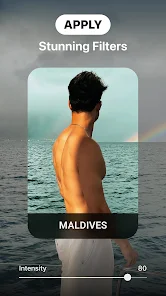

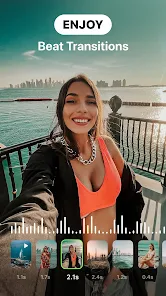
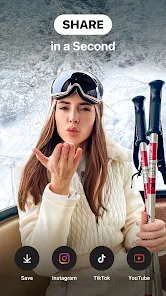
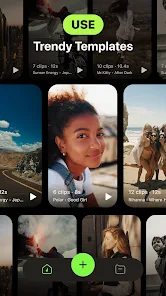
Information
- Category: Photography
- Price: free
- Age Rating: Everyone
- Available on: /
- Developer: Mobile Presets & Filters
- Updated on: May 14, 2026
Pros 
-
 Create stunning Reels easily
 - Access a wide range of templates
- Add music and effects seamlessly
- Share directly to Instagram
- User-friendly interface for all
Cons 
-
 Limited editing options available
 - Watermark on exported videos
- Performance issues on older devices
- In-app purchases can add up
- Lacks advanced analytics tools
Get Installation Details  Google Play
  App Store
Google Play App Store User Reviews
(28.7K Reviews) M N2026/02/18
Very bad!, unable to ajust photo to fit the screen! however i have to admit that i like the idea of the variety music, the choice of the speed the photos play with the music, the design of the app, but again very bad on not able to ajust the photo to fit screen, and no option for landscape or portrait! ON BEAT is much better only music is not so great. I hope they fix the problem else I stop subscription it after it expired 😕 thanks for replying, however i see no option to adjust the pictures
- Jose Cardona2025/04/13
Terrible app. Huge bait & switch after you try the demo. Bought the app based on the demo and was extremely disappointed. the The app is super restrictive and the tiny amount of preset templates cannot be edited whatsoever. You cannot edit the number of clips, the length, the aspect ratio, the music, the look. Nothing. You can't even edit which part of your clips are in the frame so sometimes the reels show nothing that you actually wanted in the video.
- Chavelle2024/07/03
Do not pay for this app. It's basically like the auto generated reels for songs on Instagram except you can't actually edit any of the videos. The templates are mostly short, and a lot of the soundtracks are edited versions. I'm assuming because of copyright issues. There's also no way to search for templates by song, you have to scroll through them which is a pain. If I could rate it 0 stars I would.
- John Kapelakis2025/05/29
This is almost a scam. buyer beware! without paid subscription, you can NOT export nor share any video. not even save it to your phone. so you are forced to pay and then, videos are saved with no music even if you choose a template with music. so you have to go find the music yourself IF it is licensed. then you tap to share to tiktok or instagram, and the video is NOt shared. this app does nothing that it promises. I want a refund now ! edit: reply to dev: I was using the paid version!
- Jamil Suleman2026/04/23
This app is designed to scam users out of their money. Before purchasing the 1-week plan, it was stated that exporting a video would require additional payment. I bought it expecting to be able to export videos with music, but it never mentioned that, after purchasing the plan, I would only be able to download the video without the music. This is a complete scam. Do not download this app!
Review Source: Google Play store public user reviews.
FAQ
Can I submit suggestions or feedback to Reels Maker for Instagram BEAT?
Yes, users can submit feedback and suggestions through the app's support section or official website.
Does Reels Maker for Instagram BEAT collect my personal data?
The app may collect some data for functionality and improvement purposes, but it prioritizes user privacy.
Does Reels Maker for Instagram BEAT support offline use?
Yes, you can use the app offline to edit videos, but some features may require an internet connection.
How do I cancel my Reels Maker for Instagram BEAT subscription?
You can cancel your subscription through your app store settings or within the app's subscription management section.
How much does a subscription to Reels Maker for Instagram BEAT cost?
Subscription costs vary based on the plan chosen, typically offering monthly or yearly options for premium features.
How to use Reels Maker for Instagram BEAT
Can I change my account information in the BEAT app?
Yes, you can update your account information in the 'Profile' section of the app.
How can I contact customer service for the Reels Maker in the BEAT app?
You can reach customer service through the app's support section or email support
How do I activate the Reels Maker feature in the BEAT app?
Go to 'Settings,' select 'Features,' and follow the prompts to activate Reels Maker.
How do I log in to the BEAT app?
Open the app, tap 'Log In,' and enter your registered email and password.
How do I report a problem with the Reels Maker feature?
Use the 'Report a Problem' option in the app's settings to submit your issue directly to support.
Similar Apps














You May Like

Falling Filter: Loop Me Effect
AI Master Lab
4.3

Hailuo Al: Image&Video Maker
MiniMax AI
4.3

Valentine's Day Photo Frame
Appwallet Technologies
4.4

Shots - AI Photo & Video Maker
DeePix AI Apps
4.4
Sexy girl video collection
Molayong
3.0

Momo - AI Photo Generator
ScaleUp
4.4

Massive Dev Chart Timer
Freestyle Photo & Imaging
4.1

Glam AI: Video & Photo Editor
Glam Labs, Inc.
4.6

Future Face - See Your Future
FutureDream Lab
4.4

Baby Month Photo Editor Frame
Ngendev Technolabs
4.6
AI Photo Editor - AI Enhancer
AlexadraJocely
4.7

Picta Photo Print - 1h Pickup
Pictarine - Printing Photos
4.8