
 Home
Home  Apps
Apps  Games
Games  Windows
  Terms of Service
  Cookies & Privacy Policy
  About us
AppBlock - Block Apps & Sites

 4.7
4.7 5,000,000+ Downloads
7.16.1 Version
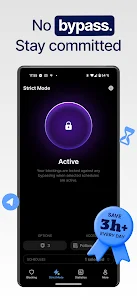
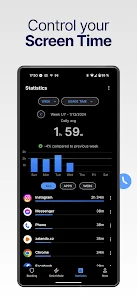
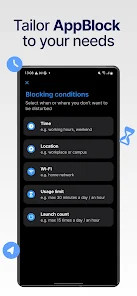
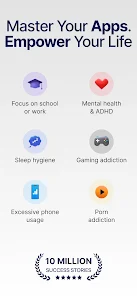
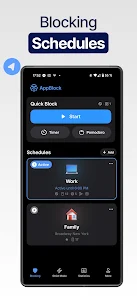
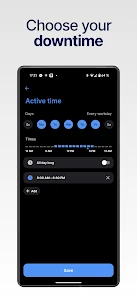
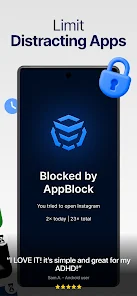
Information
- Category: Productivity
- Price: free
- Age Rating: Everyone
- Available on: /
- Developer: MobileSoft s.r.o.
- Updated on: Jul 3, 2026
Pros 
-
 AppBlock - Block Apps & Sites offers a range of features designed to enhance your productivity and focus.
 - Easily block distracting apps
- Customize your blocking schedule
- Track your usage statistics daily
- Create profiles for different tasks
- User-friendly interface for all
Cons 
-
 Limited customization options
 - May not block all apps
- Can slow down device performance
- Requires constant updates
- User interface can be confusing
Get Installation Details  Google Play
  App Store
Google Play App Store User Reviews
(229K Reviews) Greg Colvin2026/06/26
I loved the app so much that I paid It's totally ridiculousthe yearlong subscription. Now I can't set up the account you apparently need to use the premium functions. I tried to use my email. I tried to use my Google account. It consistently times out and I checked my connection with the speed test. Issues not on my end. I can't even send a help request thru the app. It's totally ridiculous.
- laura hardy2026/04/23
I used to love this app. I subscribe, and like how I can customize different blocking schedules. but they have made it way too easy to delete schedules accidentally when pausing. And such that I don't even realize I've deleted the schedule until I realize I've been on my phone too long and half my schedules have disappeared. yes, I pause, but I like pausing for 5 minutes with constant reminder to get off my phone. and now I have to recreate, they aren't backed up.
- James Kerns2026/05/16
Great app. It has really helped me become mindful of how much time I spend doomscrolling and how often I absent-mindedly attempt to open social media or a game app during times when I should be productive. If I could offer one improvement, I wish I was able to add (but not remove) apps and websites to the block list while on strict mode. Instead, no edits are allowed while on strict mode. You should be allowed to increase the strictness, but not decrease it.
- Hm G2026/06/02
A very good app! Helped me curb impulse spending late at night on fast food apps and others and I saved a lot of money. I only wish Strict Mode would intelligently block specific parts of Device Settings rather than all settings but basic wifi and Bluetooth. I have to choose between truly blocking everything I want blocked, or being able to change settings on my phone when I need to so I can add a new Bluetooth device or do more than connect to 1 of 3 devices already paired.
- Ryan Leppo2026/05/30
Honestly, this app is amazing and exactly what I needed. My only issues are that it lets you block apps you may need in an emergency (like Phone or Camera), and some features can be a little confusing at first. I'd also love a full PC version, since the browser extension isn't quite the same. A driving mode that limits the phone except for Maps and Music would be great too. Overall, 4.5/5. Thanks for a great app with room to grow! ❤️
Review Source: Google Play store public user reviews.
FAQ
Can I submit suggestions or feedback to AppBlock - Block Apps & Sites?
Yes, users can submit feedback and suggestions through the app's support section or website.
Does AppBlock - Block Apps & Sites collect my personal data?
AppBlock prioritizes user privacy and does not collect personal data for advertising purposes.
Does AppBlock - Block Apps & Sites support offline use?
Yes, AppBlock can function offline, allowing users to block apps without an internet connection.
How do I cancel my AppBlock - Block Apps & Sites subscription?
You can cancel your subscription through the app store settings on your device or within the app itself.
How much does a subscription to AppBlock - Block Apps & Sites cost?
Subscription costs vary, typically offering monthly and yearly plans for premium features.
How to use AppBlock - Block Apps & Sites
How can I contact customer service for AppBlock?
You can reach AppBlock customer service through the app's support section or by visiting their official website for contact details.
How do I activate AppBlock after installation?
After installation, open the app and follow the on-screen instructions to set up and activate the blocking features.
How do I log in to my AppBlock account?
Open the app and enter your registered email and password to log in. If you forgot your password, use the 'Forgot Password' option.
What is the customer number for AppBlock?
AppBlock does not publicly list a customer number; please use the in-app support feature for assistance.
What's New
- Premium Guest PassKnow someone who needs a phone detox? Invite them to AppBlock and get 14 days of AppBlock Premium for free.Show your progressYour screen time numbers tell a story. Now you can share them with the world. Available in the Insights tab.Block in-app purchasesOne toggle to stop impulse buys inside games and apps. Available in any blocking under Extra options.
Similar Apps











You May Like

Microsoft Word App
Microsoft Corporation
4.8
Microsoft Word: Edit Documents
Microsoft Corporation
4.8

Microsoft Teams
Microsoft Corporation
4.7
Google Calendar
Google LLC
4.6
PDF Viewer Easy
XuanLong Studio
MiraClean - File Manager
NOVAGE DEV
3.7
HAwake - Voice Assist for HA
IT-BAER
All Documents: PDF Reader
Vu Developer
Focus To-Do: Pomodoro & Tasks
Pomodoro Timer & To Do List - SuperElement Soft
4.6

QuillBot: AI Writing Assistant
QuillBot
3.8
Planet Free VPN ™ Super Proxy
Free VPN Planet
4.6

NWS Mobile
New World Publisher
4.9