
 Home
Home  Apps
Apps  Games
Games  Windows
  Terms of Service
  Cookies & Privacy Policy
  About us
NWS Mobile

 4.9
4.9 10,000+ Downloads
8.0.1018 Version
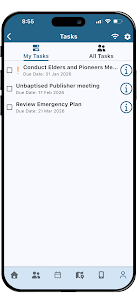
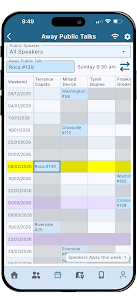
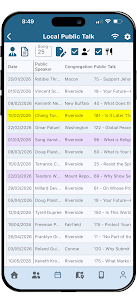
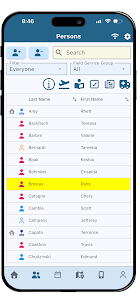
Information
- Category: Productivity
- Price: free
- Age Rating: Everyone
- Available on: /
- Developer: New World Publisher
- Updated on: Jun 25, 2026
Pros 
-
 Stay updated with alerts
 - User-friendly interface
- Access to real-time data
- Personalized notifications
- Seamless offline access
Cons 
-
 Limited offline access
 - User interface can be cluttered
- Frequent updates required
- Battery drain on devices
- Inconsistent performance issues
Get Installation Details  Google Play
  App Store
Google Play App Store User Reviews
(224 Reviews) Liévin Nduwimana2026/04/18
Nice app. in our Country to have a computer is not easy because poverty. Now we can set up all settings by using Computer after all we can use phones or tablet. but we still have some problem for some features. we can't use phone by : 1. Generating automatically programmes. other things they there is some congregation forgot their PIN congregation. we wrote New Publisher support many times for the helps they didn't reply us
- TSIZEHARE2026/04/27
I really enjoy using this mobile app. It would be a great addition to have an information board and the ability to schedule field service programs directly within the app. In my country, accessing a computer is very difficult, so having these features on mobile is essential.
- doug duval2026/06/26

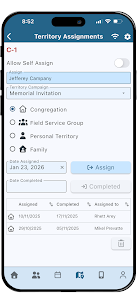
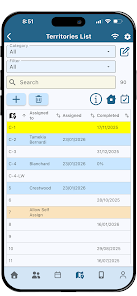
Nice app but needs enhancements to the Territory section... As a territory servant, you should be able to see individual territories in different map views to allow for assigning them to publishers. It is the only thing holding me back from using this for territory management.
- MrVaughn Parker2026/04/26
I am sure the app is amazing. But it loads in 8.0 and when I tried to enter congregation ID and Password it doesnt let me in, it says I need to update to 8.1 My PC is updated to 8.1 if that is the issue, but the NWS app loads in 8.0 and I am not into the server to update the NWS app to 8.1. It just has an error.
- Joe Nagbe2026/06/25
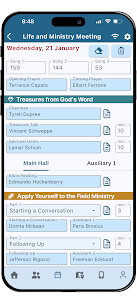
Excellent job, keep it up brothers. We find ourselves in Africa to get access to computers It is difficult. We beg you brothers to make the app available to prepared congregation schedules and group editing. If you do that Jehovah will bless you. We who have responsibility to prepare assignments in the congregation. Looking forward to future updates on the app.
Review Source: Google Play store public user reviews.
How to use NWS Mobile
Can I update my account information in the NWS Mobile app?
Yes, go to 'Account Settings' in the app to update your information.
How can I contact customer service for the NWS Mobile app?
You can reach customer service through the app's help section or by visiting the official NWS website for contact information.
How can I uninstall the NWS Mobile app?
On your device, go to the app settings, find NWS Mobile, and select 'Uninstall.'
How do I enable notifications for the NWS Mobile app?
Go to 'Settings' in the app and toggle on notifications to receive alerts.
How do I log in to the NWS Mobile app?
Open the app, enter your registered email and password, then tap 'Log In' to access your account.
What's New
- - New, modern, mobile-friendly interface!- Groups (Field Service Groups and Other Groups)- Meeting Attendance- Life and Ministry Meeting Auto-Assign- Territories Map- Public Witnessing Scheduling- Schedule Overview- Congregation Overview- Data Maintenance
Similar Apps














You May Like

Microsoft Word App
Microsoft Corporation
4.8
Microsoft Word: Edit Documents
Microsoft Corporation
4.8

Microsoft Teams
Microsoft Corporation
4.7
Google Calendar
Google LLC
4.6
PDF Viewer Easy
XuanLong Studio

MiraClean - File Manager
NOVAGE DEV
3.7

HAwake - Voice Assist for HA
IT-BAER
All Documents: PDF Reader
Vu Developer

Focus To-Do: Pomodoro & Tasks
Pomodoro Timer & To Do List - SuperElement Soft
4.6

QuillBot: AI Writing Assistant
QuillBot
3.8
Planet Free VPN ™ Super Proxy
Free VPN Planet
4.6
Yoti - your digital identity
Yoti
4.4