
 Home
Home  Apps
Apps  Games
Games  Windows
  Terms of Service
  Cookies & Privacy Policy
  About us
RTD MyRide

 3.8
3.8 500,000+ Downloads
7.9.3 Version
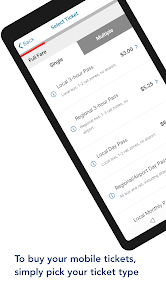
Information
- Category: Travel & Local
- Price: free
- Age Rating: Everyone
- Available on: /
- Developer: Regional Transportation District, Denver CO
- Updated on: Jan 30, 2026
Pros 
-
 Experience seamless rides
 - Real-time tracking for safety
- User-friendly interface design
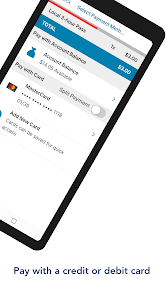
- Flexible payment options available
- Personalized ride recommendations
Cons 
-
 Limited route options available
 - Inconsistent service reliability
- Higher fares during peak times
- User interface can be confusing
- Occasional app performance issues
Get Installation Details  Google Play
  App Store
Google Play App Store User Reviews
(1.39K Reviews) Dallas M2025/01/04
MyRide has gotten better over time. I think it's fairly easy to use and I don't usually have any issues purchasing or scanning my tickets on metro lines. My biggest aks would be to redo the trip planner and next ride pages. First, they are very similar to each other and don't provide much difference, second, the trip planner is a little difficult from a UI/UX perspective when you're a newbie on the app. Too many options and it needs to be simple.
- A Google user2018/09/27
Does what it says on the tin, I guess. The fact you can't buy single tickets is ridiculous, and most of the links on the main menu open as web pages rather than in-app. There aren't any alerts or information on where your bus or train is. It's literally just a way to buy day passes, which is okay for tourists, but if you actually plan on using RTD more than about once a month you're better off getting a MyRide card and using the Transit app for information.
- Vera Karlotta Cordeta2022/11/20
Stupidest app ever. Very hard to use. Frequent referrals to browser defeats the purpose of having an app. Can't pay for parking on it, making it pretty easy to miss the train, especially at stations with large parking lot with few parking kiosks. There's no option to see what zones you need, so you're purchasing tickets blind, meaning you might not even be charged fairly. No maps on the app either. You can't add or change payment methods through the map. Aesthetic isn't bad.
- Kerry2023/04/04
Not user-friendly. You need to flag all the routes and times that are canceled on the schedules because it's difficult when you've got service alerts that make you navigate out of the app to the website to figure out what the alerts are. Also, if you're going to be canceling a huge section of the R line through October, you seriously need to add more trips on the other routes (H & E) to compensate. I've never heard of a train that only comes every 30 minutes; absolutely ridiculous.
- Marv Vis2025/08/10
Poor handling and policies of ticket purchases. Purchased tickets expire in 45 days. I received a message that my DIA bus ticket purchase failed due to some message exchange error, so I had to go through and redo the purchase. I was then charged for two $10 tickets (needing only one). The extra ticket now expires in 45 days, long before my next flight. There's no way to undo such a purchase or extend the expiration - just lousy policy and app behavior.
Review Source: Google Play store public user reviews.
How to use RTD MyRide
How can I contact customer service for the RTD MyRide app?
You can contact customer service by calling the RTD Customer Service number at 303-299-6000 or visiting their website for more options.
How do I activate my RTD MyRide app account?
To activate your account, follow the link sent to your email after registration. Click the link and set your password to complete the activation.
How do I log in to the RTD MyRide app?
To log in, open the app and enter your registered email and password. If you don’t have an account, you can create one directly in the app.
What is the customer number for RTD MyRide app inquiries?
The customer number for RTD inquiries is 303-299-6000. You can also reach them through their website for additional support.
What's New
- Added new Homescreen button.
Similar Apps









You May Like

Upside: Cash Back - Gas & Food
Upside Services Inc.
4.6
Upside-Cash back on gas & food
Upside Services Inc.
4.6
Vrbo Vacation Rentals
Vrbo
4.8
GasBuddy
GasBuddy
3.8

Viator
Viator
4.9

Royal Caribbean International
Royal Caribbean Cruises Ltd.
4.6
World Clock Widget 2025 Pro
Tomas Hubalek
4.7
WDSU Parade Tracker
HTVMA Solutions, Inc.
3.7

Wanderboat: Local Guide
UTA AI Inc.
4.4

Parade Pal: Parade Tracker
ParadePal
3.7
Otaghak
Otaghak Group
4.2
JetBack: Airfare Price Credits
JetBack – Get Airline Credits when Airfare Drops
4.1