
 Home
Home  Apps
Apps  Games
Games  Windows
  Terms of Service
  Cookies & Privacy Policy
  About us
Volaris

 4.0
4.0 1,000,000+ Downloads
2.12.1 Version
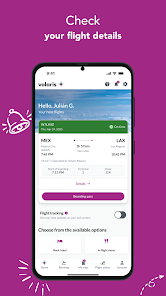
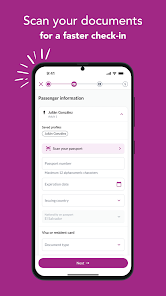
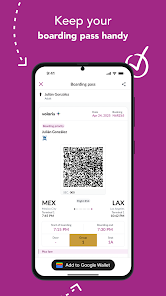
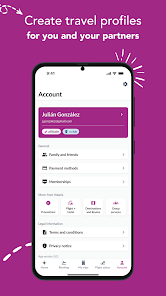
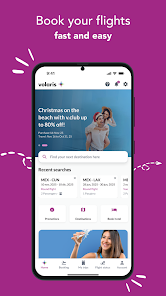
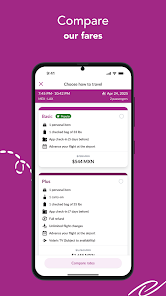
Information
- Category: Travel & Local
- Price: free
- Age Rating: Everyone
- Available on: /
- Developer: Volaris
- Updated on: Jun 19, 2026
Pros 
-
 Affordable fares for budget-conscious travelers
 - Extensive route network across North America
- Convenient online booking and check-in options
- Flexible travel policies for changing plans
- Friendly customer service and support available
Cons 
-
 Limited legroom can be uncomfortable for long flights
 - Additional fees for baggage increase overall costs
- Inconsistent customer service can lead to frustration
- Flight delays are common, affecting travel plans
Get Installation Details  Google Play
  App Store
Google Play App Store User Reviews
(14.2K Reviews) Byron Guzman2026/03/03
They have slow customer service, and their app is not efficient at all. I accidentally selected different seats and exited out of the app before checking in. When I reopened the app to check in, I could no longer do it, and it wouldn't proceed to check in until I paid for the seats selected. I have already paid for my tickets but just needed to check in. When I reached out to customer service, it took hours to get a response just for them to tell me I have to pay, and I can't remove services.
- slεερү clεσ2026/02/09
thsi app completely failed at replacing checking in on the website. it's buggy, does not let you but your information in manually (you are forced to take a picture of your documents), it takes an unreasonably long time to get anywhere within the app- and! it's the only option you have! i have heard the other apps were just as bad but this is the first I've had to review so low in a long time.
- Alexander Suleymanov2026/04/18
The primary purpose of the airline's app is to provide flight information readily and simplify check-in. This app fails at both. It updates the gate info at the very last moment. It never pre-caches boarding passes, so opening them is painful, especially in Mexico where the Internet can be slow. Free advice: don't use the app, print boarding passes, and check the board for flight updates.
- guadalupe noyola2026/03/18
Worst app ever. You can attempt to do the check in and it works less than half of the time. Sometimes you can do one but not your travel partner's or childrens'.Most of the airport terminals have huge lines due to this app error and when they are down the attendants will try to charge you even though you prove it is not user error. worst system all together.
- Nick Menjivar2026/02/24
Horribly buggy app. I tried adding checked luggage 3 different times which resulted in errors. It was only on the 3rd time when I was finally able to complete the transaction. It was only then that I was charged for all 3 transactions. Volaris Customer Service is useless and will not refund you nor the airport attendants will not help get your refund either. They will force you to submit a case through a form online, which may take up to 3 days to hear any reply.
Review Source: Google Play store public user reviews.
How to use Volaris
Can I check my flight status through the Volaris app?
Yes, you can check your flight status by selecting the "Flight Status" option in the app and entering your flight details.
How can I change my seat on a flight booked through the Volaris app?
Log in to the app, go to "My Trips," select your flight, and choose the "Change Seat" option to select a different seat.
How can I contact Volaris customer service?
You can contact Volaris customer service by calling their toll-free number or through their official website's contact page. Live chat is also available for immediate assistance.
How can I reset my password in the Volaris app?
On the login screen, tap "Forgot Password?" Follow the prompts to enter your email and receive a password reset link.
How do I cancel a flight through the Volaris app?
Log in to the app, go to "My Trips," select the flight you wish to cancel, and follow the prompts to complete the cancellation process.
What's New
- With the new payment management system and a few configuration changes, you’ll be able to use the app more efficiently. Plus, you can now save your travel companions’ profiles to book faster, and if you need help, use our new smart assistant, ARI! Download the new version and book more easily.
Similar Apps














You May Like

Upside: Cash Back - Gas & Food
Upside Services Inc.
4.6
Upside-Cash back on gas & food
Upside Services Inc.
4.6

Vrbo Vacation Rentals
Vrbo
4.8

GasBuddy
GasBuddy
3.8

Viator
Viator
4.9

Royal Caribbean International
Royal Caribbean Cruises Ltd.
4.6

World Clock Widget 2025 Pro
Tomas Hubalek
4.7

WDSU Parade Tracker
HTVMA Solutions, Inc.
3.7

Wanderboat: Local Guide
UTA AI Inc.
4.4

Parade Pal: Parade Tracker
ParadePal
3.7

Otaghak
Otaghak Group
4.2

JetBack: Airfare Price Credits
JetBack – Get Airline Credits when Airfare Drops
4.1