
 Home
Home  Apps
Apps  Games
Games  Windows
  Terms of Service
  Cookies & Privacy Policy
  About us
Autolink

 3.0
3.0 1,000,000+ Downloads
2.0.59 Version
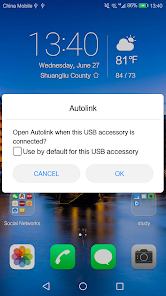
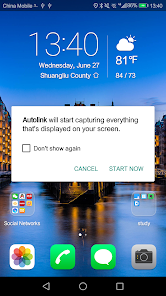
Information
- Category: Auto & Vehicles
- Price: free
- Age Rating: Everyone
- Available on: /
- Developer: 凌阳成芯科技(成都)有限公司
- Updated on: Dec 11, 2025
Pros 
-
 Experience seamless navigation
 - Connect with friends easily
- Discover new places nearby
- Personalized recommendations await
- Stay updated with real-time alerts
Cons 
-
 Limited customization options
 - Occasional syncing issues
- User interface can be cluttered
- Requires constant internet access
- Not compatible with all devices
Get Installation Details  Google Play
  App Store
Google Play App Store User Reviews
(14.3K Reviews) Alex K2020/09/18
Good, but room for improvement. I use this with a Samsung Note 20 Ultra. It mirrors the screen well with great definition, but the frame rate seemed to a max of 30fps. Netflix and Hulu don't work with it, Hulu going as far as to tell you the display isn't supported. YouTube works fine but again only at 30fps. This app isn't recognized by "SmartView" so you can't change the aspect ratio or resolution to fit your car display. Can't use with display off. There's a constant "connecting" notification
- Rovin Mohabir2021/05/11
Started working from front usb port. I will try to disconnect the rear wire harness and reconnect it to see if the rear usb will work. I tried connecting first from front usb, then wait for confirmation from phone to link. Then when it links, I turn on the Bluetooth. Seems to work fine this way. App works good when you can get it to work. Also allows you to turn phone to get a full screen of map or certain apps that allow like media apps.
- Pappu Imran2024/10/28
Need fix the app. Last night I tried so many times to connect it. But it happened only for one time. Then when I tried to open navigation feature, it's disconnected automatic. Then later I failed to connect it again. Even for normal use ... Very poor performance....not acceptable.
- Drum Brakes2025/05/01
Truly awful alternative to android auto when combined with the audio units that use it. I had frequent disconnections, which then reverted to FM radio. Could only be fixed by unplugging and replugging the phone. I'll be avoiding any audio unit that uses this app. The App may do its job fine, but the audio units that use it are sub standard.
- Nick Layton2024/08/27
Works with my Xzent unit, turning the phone sideways fills the screen. Still best to use the phone screen to operate as the touch screen on the xzent doesn't seem the correspond with control other phone. Biggest problem is the slight delay when navigating, you can easily miss the turn while it catches up with your position.
Review Source: Google Play store public user reviews.
How to use Autolink
How can I contact customer service for the Autolink app?
You can reach customer service through the app's support section or by visiting the official website for contact details.
How do I activate the Autolink app?
To activate, download the app, create an account, and follow the on-screen instructions to complete the activation process.
How do I log in to the Autolink app?
Open the app, enter your registered email and password, then tap 'Log In' to access your account.
What is the customer number for Autolink support?
The customer number can be found in the app under the 'Help' or 'Support' section.
What's New
- fix some issues for higher android os version
Similar Apps











You May Like

CarGurus
CarGurus, Inc
4.7

Shell: Fuel, Charge & More
Shell Information Technology International B.V.
3.5
Driving Instructor-Theory Test
Naz Digital
4.6
Fuel Forward
Phillips 66 Mobility
4.5

Talenelectric
深圳市天能健电气技术有限公司
Sentry Pro—Tesla Notifications
Sentry Brain S.M.P.C.
4.4

Redtiger Cam
REDTIGER TECH, INC.
2.5
OBD2 Car Scanner: Torque ELM
MONIQ TAP., CO LTD
3.9
CL Theme Card
Apps LabDev
Car Play Connect for Android
LeoStudio Global Ltd.
4.4
BimmerLink for BMW and MINI
SG Software GmbH & Co. KG
4.3
BikeWale- Bikes & Two Wheelers
CARTRADE TECH LTD
4.6