
 Home
Home  Apps
Apps  Games
Games  Windows
  Terms of Service
  Cookies & Privacy Policy
  About us
Home Security Camera - SeeCiTV

 4.2
4.2 1,000,000+ Downloads
7.8 Version
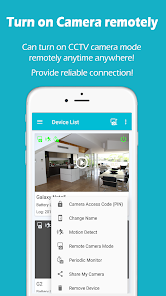
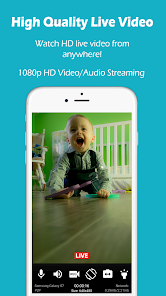
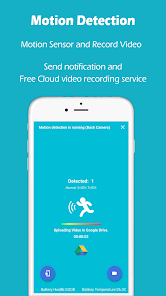
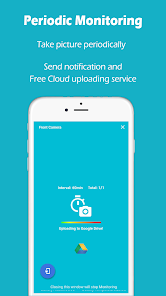
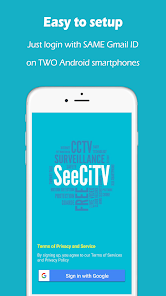
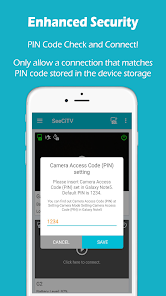
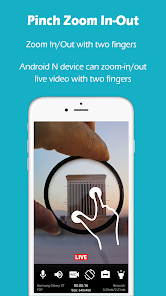
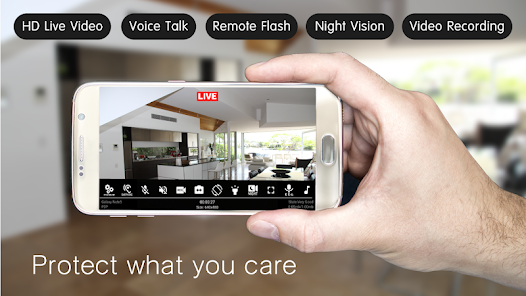
Information
- Category: House & Home
- Price: free
- Age Rating: Everyone
- Available on: /
- Developer: Geny Studio
- Updated on: Nov 23, 2025
Pros 
-
 Enhance your home security
 - Live streaming from anywhere
- Receive instant motion alerts
- Easy setup and user-friendly
- Store footage in the cloud
Cons 
-
 Limited cloud storage options
 - High subscription fees apply
- Privacy concerns with data use
- Requires stable internet access
- Potential for false alerts
Get Installation Details  Google Play
  App Store
Google Play App Store User Reviews
(17.1K Reviews) A Google user2019/06/24
I'vE used this app on multiple (5) Android devices. Samsung, and ZTE. A couple of my Androids are quite old. All but 1 were Wi-Fi only devices. I've not had any issues whatsoever. The ads weren't a bother. And I wasn't bombarded with them at all. Barely noticeable. And I recently had occasion to email the Devs with a question... They replied in less than 5 minutes. I recommend this app highly.
- Colin Donaldson2021/02/06

App works okay, however after purchasing the pro version, every once in awhile it decides to say that I haven't purchased it and that I can't have more than one device connected unless I purchase the pro version. Always having to shut the whole thing down, on both devices sometimes, and restart it so that goes away. Also, no multi-view support, and recordings do not have audio. If I can hear people talking while streaming, I should hear them when this thing records them.
- Perry2025/01/31
I have used this app for a few years. I would rate 5 stars, but some months ago, I stopped receiving any & all notifications to the monitoring device. I went so far as to reinstall on both devices... still no notifications. Yes, all notifications are turned on. The camera still detects and uploads to google drive, but does not notify of events, or wifi loss, or when camera mode is turned on or off. The lack of real time notifications of detections makes the app useless for my purposes.
- A Google user2019/06/20
It's ok. But I do not like it as much as ivideon. for one thing it doesn't give as wide a view. If you turn phone sideways picture gets smaller. it. doesn't have night vision on it. when in motion detect it does capture good photo of cars going by. settings are to easily changed without realizing it. it's ok like I said not as goid as the other I. have. But my other I can only use two camera phones on so I had to find another app to use for my 3rd one.. however it does capture motion faster.
- JM2021/04/03
Has potential but a monthly fee? I don't know about that. The camera settings on the free version are not sticking. I'm not sure if this is a bug or because it is the free version but it certainly makes the app unreliable. Otherwise it has great features and works very well when it's on. Good (fast) notifications. Records instantly. Very sensitive for dark places and works well with Google drive cloud and local storage.
Review Source: Google Play store public user reviews.
FAQ
Can I submit suggestions or feedback to SeeCiTV?
Yes, users can submit feedback and suggestions through the app's support section or website.
Does SeeCiTV collect my personal data?
SeeCiTV may collect personal data for account creation and service improvement, but it prioritizes user privacy.
Does SeeCiTV support offline use?
Yes, SeeCiTV allows limited offline functionality, but full features require an internet connection.
How do I cancel my SeeCiTV subscription?
You can cancel your subscription through the app settings or your app store account settings.
How much does a subscription to SeeCiTV cost?
Subscription costs vary based on the plan chosen, typically starting at a low monthly fee.
How to use Home Security Camera - SeeCiTV
How can I contact customer service for the SeeCiTV app?
You can reach customer service through the app's support section or by visiting the official website for contact details.
How do I log in to the SeeCiTV app?
Open the app, enter your registered email and password, then tap 'Log In' to access your account.
Is there a way to activate my SeeCiTV camera?
Yes, follow the in-app instructions to connect your camera to Wi-Fi and complete the activation process.
What is the customer service number for SeeCiTV?
The customer service number is available on the official SeeCiTV website under the contact section.
What's New
- Bug fixes
Similar Apps














You May Like

AI Remodel - Interior Design
Dmytro Bubela
4.5
Universal Tv Remote-Cast to TV
One Music Player
4.1

House Design Plan 3D App
Wallet Passes Alliance
4.5

Home Assistant
Home Assistant
4.6

Palmstreet: Shop & Sell LIVE
Plant Story
4.7

Foreclosure Home Search
Heavy Hammer
4.0

This Old House
This Old House
3.8

Rinnai Central
Rinnai America Corporation
1.4

Paint my House: Exterior Color
Try the Colors s.r.o.
4.3

Neighborbrite Landscape Design
Neighborbrite Inc.

HonySmart
Dawnwin Techonology
1.9

Authenticator Secure 2FA OTP
Duong Van Luong
4.3