
 Home
Home  Apps
Apps  Games
Games  Windows
  Terms of Service
  Cookies & Privacy Policy
  About us
My Verisure

 4.8
4.8 5,000,000+ Downloads
10.176.1 Version
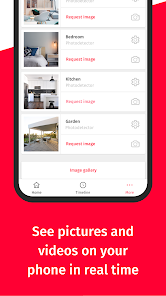
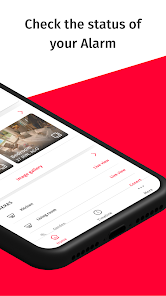
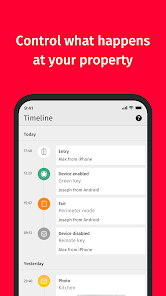
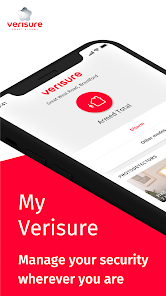
Information
- Category: House & Home
- Price: free
- Age Rating: Everyone
- Available on: /
- Developer: Verisure Group
- Updated on: Jul 1, 2026
Pros 
-
 Stay connected to your home
 - Real-time security alerts
- Control devices remotely
- User-friendly interface
- 24/7 customer support
Cons 
-
 Limited customization options
 - Occasional connectivity issues
- User interface can be clunky
- Notifications may be delayed
- Requires constant updates
Get Installation Details  Google Play
  App Store
Google Play App Store User Reviews
(143K Reviews) LeedsExplorer272026/06/10
We Had Our Verisure Alarm Installed Almost 3 Years Ago And I Must Say It Is Quite A Good System, Its Design On The Keypad Is Very Sleek And Their Advanced Zero vision Is Good, I Never Had an Occasion Where There Was A Real Alarm But There Were Some False Alarms But Verisure Responded Veru Quickly And I Am Impressed! The Monthly Cost Does Get A Little Pricey If You Have Lots Of Sensors/Devices. But Its A Really Good System! Keypad And Its Features Could Be Better But Its Still A Good System !
- Franco Cab2026/06/12
it crashes all the time when I open it, I can't use it at all, only some rare times it works, please help. Edit: only happens when I use biometrics, I uninstall and re-install, don't activate biometrics and it works, as soon as I use biometrics it starts crashing everytime I open it
- Christina Bramwell2026/05/05
can't access the app for a while keep getting asked to call customer services when I do get told to call back a different number. images are blurry, system cuts out and keeps having power cuts, couple of times came home and alarm was off. pressed panic button and they called the panel and accepted all was ok although was obvious there was something wrong and I had a male there behind watching me what I was saying. my alarms though go off if front room window left open no other windows affect it.
- Jacqui Egan2026/06/26
great service. Exicellent for brain damaged people like me to understand how it works. Fantastic team putting my mind at rest when I accidentally set off the alarm. They talk me through it. I take my mobile to hospital with me and I can turn alarm on or off from there. I also have shock absorbers on my window and patio door and a camera indoors. well worth the money. 🫠🫠
- H T2026/07/01
Please stop the useless spam, how can an alarm app be pestering 24x7 for useless things, ads, and tips on how to use it? Add notification classification to allow only real important ones please!
Review Source: Google Play store public user reviews.
FAQ
Can I submit suggestions or feedback to My Verisure?
Yes, users can submit feedback and suggestions through the app or by contacting customer support directly.
Does My Verisure collect my personal data?
Yes, the app collects personal data to provide services and improve user experience, adhering to privacy regulations.
Does My Verisure support offline use?
No, My Verisure requires an internet connection to function properly and access your security system.
How do I cancel my My Verisure subscription?
You can cancel your subscription by contacting Verisure customer support or through your account settings in the app.
How much does a subscription to My Verisure cost?
Subscription costs vary based on the chosen plan and services; please check the Verisure website for details.
How to use My Verisure
How do I activate my My Verisure app account?
To activate your account, download the app, enter your Customer Number and follow the prompts to set up your password and security settings.
How do I contact Customer Service for the My Verisure app?
You can contact Customer Service through the app's support section or by calling the customer service number provided on your account details.
How do I log in to the My Verisure app?
Open the app, enter your registered email and password, then tap 'Log In'. If you forget your password, use the 'Forgot Password' option.
What is the Customer Number for My Verisure app support?
Your Customer Number can be found in the app under your account settings or on your contract documents.
What's New
- We include updates in My Verisure to constantly enhance your security experience. Here are the latest:- More convenience when performing high-security actions. Now, you can authorize your mobile devices to simplify processes that require verification, such as changing your password or requesting that we connect your alarm if you're unable to.The Verisure development team continues working every day, and you can expect more updates in your app soon.
Similar Apps














You May Like

AI Remodel - Interior Design
Dmytro Bubela
4.5
Universal Tv Remote-Cast to TV
One Music Player
4.1

House Design Plan 3D App
Wallet Passes Alliance
4.5

Home Assistant
Home Assistant
4.6

Palmstreet: Shop & Sell LIVE
Plant Story
4.7

Foreclosure Home Search
Heavy Hammer
4.0

This Old House
This Old House
3.8

Rinnai Central
Rinnai America Corporation
1.4

Paint my House: Exterior Color
Try the Colors s.r.o.
4.3

Neighborbrite Landscape Design
Neighborbrite Inc.

HonySmart
Dawnwin Techonology
1.9

Authenticator Secure 2FA OTP
Duong Van Luong
4.3