
 Home
Home  Apps
Apps  Games
Games  Windows
  Terms of Service
  Cookies & Privacy Policy
  About us
Zillow 3D Home Tours

 4.1
4.1 100,000+ Downloads
2026.5.0 Version
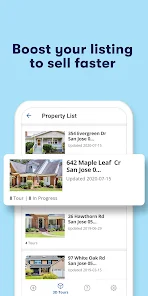
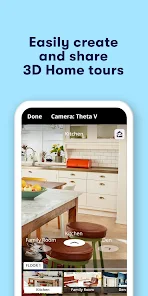
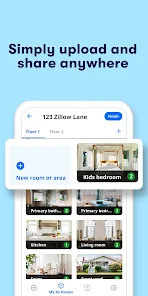
Information
- Category: House & Home
- Price: free
- Age Rating: Everyone
- Available on: /
- Developer: Zillow
- Updated on: Jun 30, 2026
Pros 
-
 Experience immersive tours
 - Showcase properties in detail
- Attract more potential buyers
- Easy sharing on social media
- Enhance listings with visuals
Cons 
-
 Limited device compatibility
 - Requires high-quality equipment
- Steep learning curve for users
- Potential for slow loading times
- Limited editing features available
Get Installation Details  Google Play
  App Store
Google Play App Store User Reviews
(697 Reviews) Kelcey Schroder2026/06/05
Every house I do a 360 tour of the app crashes at least twice during taking photos. Then, the images say they are cleared (green) but later I have rooms missing in the floor plan because the the panoramas never uploaded. So many bugs and slow performance with this app. I am quite surprised that Zillow doesn't have something better than this. Fix it, please!
- Brad Falkner2026/04/30
Two stars due to ongoing connectivity issues. when I first purchased my Ricoh Theta X the connection with the app was almost instantaneous. now a few months later I have to often restart the camera and restart the app in order to get it connected and sometimes it is a very long process. Edit: Hooray! The connectivity issues appear to have finally been addressed. Thusly, I will increase my rating.
- Karen Rice2022/07/01
The APP is Always Troublesome! It takes so much time, waiting for the app to communicate with the camera and then some of the time the images fail to transfer from the camera to the app, and you have to redo the entire tour again. Extremely frustrating! There is no way to simply upload the panoramas from the camera to the listing if the app fails. Do better Zillow. You certainly have the money to provide a more reliable platform!
- James Gordon2022/03/09
Just about one out of every three tours simply won't post straight away, often will take lots of troubleshooting... would be less frustrating if the app told you the problem, rather than "Sorry this tour can't be posted right now." Constantly causes the Theta to crash, or disconnects when standing right next to the camera. Edit: App has been massively improved in recent months. Still causes the camera to crash occasionally, but posting tours is much more reliable.
- Stephen Crow2020/12/04
I have been using the OIS version of this app for about 8 months with good results. Apparently there are an update on the Apple version that broke the app, Zillow sent out an email stating they were hard at work to fix the problem and advised us to use the Android version if possible until the problem was solved. I downloaded it and noticed i was getting inconsistent results. Most interior photos were under exposed and not usable. But, when I put on the 3 second timer it worked
Review Source: Google Play store public user reviews.
FAQ
Can I submit suggestions or feedback to Zillow 3D Home Tours?
Yes, users can submit feedback through the app's support section or website.
Does Zillow 3D Home Tours collect my personal data?
Yes, the app may collect personal data for account creation and usage analytics.
Does Zillow 3D Home Tours support offline use?
Yes, users can access previously downloaded tours offline.
How do I cancel my Zillow 3D Home Tours subscription?
You can cancel your subscription through your account settings in the app or via the app store.
How much does a subscription to Zillow 3D Home Tours cost?
The app offers premium features through a subscription, typically around $49 per month.
How to use Zillow 3D Home Tours
How can I contact customer service for the Zillow 3D Home Tours app?
You can reach Zillow customer service through their website or by calling their support number listed in the app.
How do I log in to the Zillow 3D Home Tours app?
Open the app and tap on the "Log In" button, then enter your email and password associated with your Zillow account.
Is there a way to activate the Zillow 3D Home Tours app?
The app does not require activation; simply download it from the app store and log in with your Zillow account.
What is the customer number for Zillow 3D Home Tours?
The customer number can be found on the Zillow website under the contact section or within the app's help menu.
What's New
- Bug fixes and improvements.
Similar Apps














You May Like

AI Remodel - Interior Design
Dmytro Bubela
4.5
Universal Tv Remote-Cast to TV
One Music Player
4.1

House Design Plan 3D App
Wallet Passes Alliance
4.5

Home Assistant
Home Assistant
4.6

Palmstreet: Shop & Sell LIVE
Plant Story
4.7

Foreclosure Home Search
Heavy Hammer
4.0

This Old House
This Old House
3.8

Rinnai Central
Rinnai America Corporation
1.4

Paint my House: Exterior Color
Try the Colors s.r.o.
4.3

Neighborbrite Landscape Design
Neighborbrite Inc.

HonySmart
Dawnwin Techonology
1.9

Authenticator Secure 2FA OTP
Duong Van Luong
4.3