
 Home
Home  Apps
Apps  Games
Games  Windows
  Terms of Service
  Cookies & Privacy Policy
  About us
Premium Parking

 4.3
4.3 500,000+ Downloads
5.0.3 Version
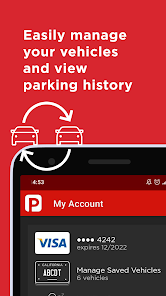
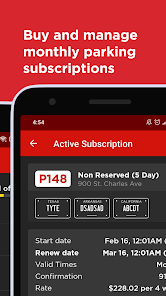
Information
- Category: Maps & Navigation
- Price: free
- Age Rating: Everyone
- Available on: /
- Developer: Premium Parking
- Updated on: Jun 8, 2026
Pros 
-
 Discover convenient parking
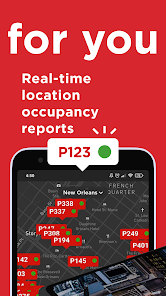
 - Find spots in real-time
- Save money with exclusive deals
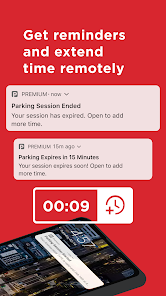
- Easily extend your parking time
- User-friendly interface for all
Cons 
-
 Limited availability in areas
 - Higher costs compared to free apps
- User interface can be confusing
- Occasional technical glitches occur
- Customer support response time
Get Installation Details  Google Play
  App Store
Google Play App Store User Reviews
(2.53K Reviews) Matt Hillman2026/03/29
This app doesn't allow you to add time to your parking until your time is up. It also doesn't notify you when your time is about to expire. The max time you can add to the app is 72 hours. I have to use this app because the hotel I stay at requires it. my stays are several weeks long and if I don't set my own alarm to remind me to pay my parking every 72 hours, then I'm screwed. I feel this app is very predatory and the designers are only in it to get kick backs from fines from tickets or fees.
- Raymond Ropiak2026/03/14
first of all try to remember the name of this app that doesn't have parking in the title in a whole phone of apps. also if you use your camera to scan the QR code it doesn't automatically open the app if you've downloaded it. third, while trying to pay for parking from the payment page, there is no feedback when you click continue that the order is being processed so I wait a couple seconds click again and then get notified that I've paid and extended my parking
- Eric McCall2022/09/23
I couldn’t “extend” my time for the space, and couldn’t “Park again”, it would say my vehicle was already parked in that zone. I could only rebuy the same block of time I purchased the first time I don’t need another 2 hours, only needed to extend for 30 minutes, and it would never accept payment when trying to extend time. So, I started buying smaller blocks of time and repurchasing those, very inconvenient and it cost more. I almost thought it was a scam to get more money. Fix that & its a 5.
- Athena Depper2023/12/18
VERY poor UI. Took FOREVER to get signed up, and then when I finally did, was unable to extend my session after several attempts. Finally, I was able to do it, but only for 1 hour, even though I only needed an additional 10 minutes (so even 30 minute option would have been acceptable). Then, when requesting a receipt after the entire session was done, it only send me for the extended time, and I could not access the original time for that receipt. And their email bounces back undeliverable.
- Beverly Brooks2024/11/21
This app is NOT user friendly! The first time I used it, it have me the option to either purchase a set amount of time or select to start parking and end it if you don't know how long you'll be. So I selected that option, pressed Start and went on my way. When I was ready to leave there was no stop option. Later that evening I pulled up the app again and it asked me if I wanted to STOP parking! It charged me a full day at $56.00. The company refunded what I over paid. This is part 1 of my review
Review Source: Google Play store public user reviews.
How to use Premium Parking
How can I contact customer service for the Premium Parking app?
You can contact customer service through the app's help section or by calling the customer support number listed on the Premium Parking website.
How do I log in to the Premium Parking app?
To log in, open the app, enter your registered email and password, then tap the login button.
Is there a way to activate my Premium Parking account?
If you need to activate your account, check your email for an activation link sent during registration. Click the link to activate.
What is the customer service number for Premium Parking?
The customer service number for Premium Parking is available on their official website under the contact section.
What's New
- Enhanced overall app stability and performance for a smoother user experience
Similar Apps














You May Like

MapQuest
MapQuest
3.4

Wellsite Navigator
Wellsite Navigator, LLC
4.2

TroutRoutes: Trout Fishing App
onXmaps
3.9
Location Share: Live Tracker
WINDWAVE LIMITED
4.1
Live Earth Map: GPS Satellite
Az Game Inc

JOLT Electric Vehicle Charging
Jolt Charge Developer
1.3
GPS Map Cam: Phone Tracker
Amobear Application Publishing
3.9

GOHUNT / Hunt Research & Maps
goHUNT LLC
3.7
Boat Beacon - AIS Navigation
Electric Pocket
3.3

بلد - مسیریاب، نقشه - Balad
Balad maps
4.3
MacroPoint for Truckers
Descartes Intl.
4.5

Magic Earth Navigation & Maps
Magic Lane International BV
1.6