
 Home
Home  Apps
Apps  Games
Games  Windows
  Terms of Service
  Cookies & Privacy Policy
  About us
Remind: School Communication

 4.3
4.3 10,000,000+ Downloads
15.6.4 Version
Information
- Category: Education
- Price: free
- Age Rating: Everyone
- Available on: /
- Developer: Remind101
- Updated on: Aug 14, 2025
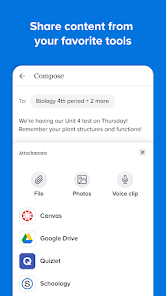
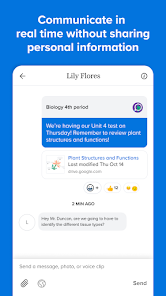
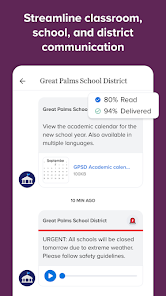
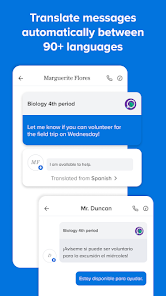
Remind is a mobile app and website that helps teachers, students, and parents communicate quickly and efficiently. It allows teachers to send messages to students and parents, and students and parents to send messages to teachers. It also allows teachers to create groups for classes, teams, or clubs, and send messages to the entire group at once. Remind is a great way to keep everyone in the loop and ensure that everyone is on the same page.
Features & Highlights
Real Experience Using Remind: School Communication
Application Scenarios
Using Remind has become an integral part of my daily routine, especially during the school year. Every morning, I check the app for any updates from my children's teachers. Recently, there was a sudden weather change that prompted the school to cancel an outdoor field trip. Thanks to Remind, I received a notification within minutes, allowing me to adjust my plans for the day. Additionally, I often communicate with other parents through the group messaging feature, which has proven invaluable for coordinating carpool arrangements or sharing notes from missed classes.
User Experience
Navigating the Remind app is a breeze. The user interface is clean and intuitive, making it easy to send messages, check for updates, and access shared files. I appreciate how seamless the workflow is; for instance, when I want to send a message to my child's teacher, I can do so in just a few taps. Notifications are prompt, and I rarely miss important messages. The performance of the app has been solid; it rarely crashes and loads quickly, even when I’m on the go. After using Remind for several months, I feel more connected to my kids’ educational journeys, and it has genuinely eased the stress of managing school communication.
Pricing
Remind is free to download and use, which is a significant advantage for parents and educators alike. While there are some premium features available through Remind’s subscription service, the basic functionalities cover most needs effectively. I appreciate that the app remains accessible to everyone without the burden of additional costs, allowing all families to stay connected with their children’s education.
Updates & Support
The app receives regular updates that enhance its functionality and improve user experience. I’ve noticed improvements in the messaging capabilities and minor tweaks in the UI that make navigation even smoother. Additionally, Remind provides a robust support system, including a comprehensive FAQ section and customer service options. Whenever I’ve encountered an issue, the support team has been quick to respond, ensuring that users feel valued and heard.
Security & Privacy Review
As a parent, security and privacy are paramount when using any educational app. Remind is available on both the App Store and Google Play, which ensures that users can download it from a trusted source. Registration requires minimal personal data, primarily focusing on user roles (teacher, student, parent), which I find reassuring. The app does not display intrusive ads, nor does it engage in excessive tracking behaviors that could compromise user privacy. Instead, the focus remains on facilitating communication between educators and families. Overall, I feel secure using Remind, knowing that my family’s information is treated with respect and caution.
Pros 
-
 Enhances parent-teacher communication effectively
 - Supports real-time updates and announcements
- Encourages student engagement and participation
- Simplifies scheduling and event coordination
- Offers easy access to resources and information
Cons 
-
 Limited customization options for messages
 - User interface can be confusing
- Notifications may overwhelm parents and students
- Reliance on internet access for functionality
 Google Play
  App Store
 User Reviews
(227K Reviews) A Google user2019/08/14
It's a fairly simple app to use. No bells and whistles, does what it says. The inability to mark things as read or clear notifications in the app is annoying. The character limit is also a hindrance. Aside from those two things, I like it. Edit: This is great for sending messages but terrible for receiving them. Often I'll get a notification that I have a message but the message will not show up. Even if I go to the message history for that person, nothing new appears.
- LR Havoc2022/09/14
Overall, it's a great app. Most of the clubs and activities at my school send out info through Remind, so the app is handy to have. There's no ads in the way and it's easy to use. The only down side it that there's no option to delete, archive or even hide old conversation. I still have random conversations from teachers and classmates from 2017! And since the main page of the app is the conversations, they get in the way and are really annoying. Please fix this!!! Then I'll give it 5 stars.
- A Google user2020/04/19
It is nice to use as a basic chat app with your classes, however it is EXTREMELY limited. Videos cannot be shared or uploaded, which to me seems like the very first thing you'd want to have for your class. Announcements, which are how you talk to your whole class, are limited to an extremely small number of characters, voice messages are ridiculously limited to like 15 seconds.
- A Google user2019/01/26
This is a really nice app to communicate with my team! A part of me wishes that regular students could message anyone, not just leaders. It's kind of difficult sometimes for students to go through me for information on another. Notifications are almost instant and I haven't had many problems so far. Joining classes is alright, but sometimes it duplicated my account. I would definitely reccomend this app!
- Trenda Jones2020/07/11
It's perfect for getting reminders. However, it's not easy to delete classes once they are over. Also it will sometimes continue to give alert to unread messages that I'm unable to find anywhere and it looks like all messages have been read. Maybe they could set class expiration dates so that participants can confirm when they are no longer in a class and so that organizers can remember to delete the class. As for the unread messages, unsure how it could be fixed.
Review Source: Google Play store public user reviews.
FAQ
Does Remind: School Communication collect my personal data?
Yes, Remind: School Communication may collect personal data such as names, email addresses, and phone numbers to facilitate communication, but it follows strict privacy policies to protect user information.
Does Remind: School Communication offer a free trial or free version?
Yes, Remind: School Communication offers a free version that includes basic messaging features, allowing users to communicate without a subscription.
Does Remind: School Communication require an internet connection?
Yes, Remind: School Communication requires an internet connection to send and receive messages and updates in real-time.
How can I contact support or send feedback for Remind: School Communication?
You can contact support or send feedback for Remind: School Communication by visiting their help center on their website or using the support feature within the app.
How do I manage or cancel my Remind: School Communication subscription?
You can manage or cancel your Remind: School Communication subscription through your account settings within the app or website, where you can also find options for changing your plan.
How to use Remind: School Communication
How can I contact customer service for the Remind app?
You can contact Remind customer service through their help center at help.remind.com or by emailing support
How do I activate my Remind account?
You activate your account by following the link sent to your email after registration. Click the link to confirm and set up your account.
How do I find the customer number for Remind?
Remind does not have a specific customer number; you can reach support through their website or email.
How do I log in to my Remind account?
Go to the Remind website or app, enter your email or phone number, and password, then click 'Log in.'
What's New
- To make your Remind experience great, we update our app every two weeks with features that help simplify communication and improve speed and performance. You can turn on automatic updates in the Play Store app, and check out our FAQs for what’s in our newest release: rmd.me/updates
Similar Apps















You May Like

Finelo: Master Trading
Finelo Limited
4.5

Speak: Language Learning
Speakeasy Labs
4.7

IXL
IXL Learning
4.3

Stellarium Mobile - Star Map
Noctua Software
4.8

VeinFinder: Anatomy Study
R&D's R&D
3.7

iRead-3 Practice App
WillPfaffy

Nibble: Your Bite of Knowledge
KREMITAL LIMITED
4.4

phyphox
RWTH Aachen University
4.8

Talkpal - AI Language Learning
Talkpal, Inc.
4.3

Nerd AI - Tutor & Math Helper
Deep Flow Apps
4.6

Language Learning - Ling
Ling Learn Languages
4.5

Luzia: Your AI Assistant
FACTORIA ELCANO SL
4.5