
 Home
Home  Apps
Apps  Games
Games  Windows
  Terms of Service
  Cookies & Privacy Policy
  About us
Stimuler AI: English Fluency

 4.8
4.8 5,000,000+ Downloads
2.3.259 Version

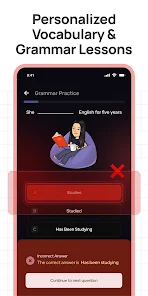
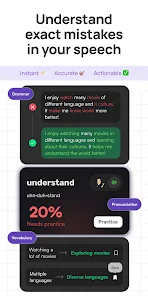
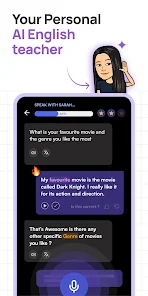
Information
- Category: Education
- Price: free
- Age Rating: Everyone
- Available on: /
- Developer: Stimuler
- Updated on: Jul 4, 2026
Pros 
-
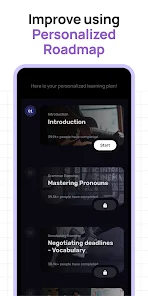
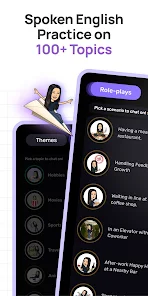
 Enhance your speaking skills
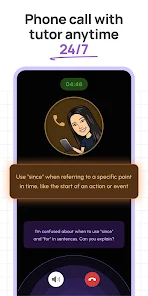
 - Practice with real-time feedback
- Engaging lessons for all levels
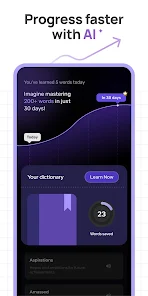
- Track your progress easily
- Join a community of learners
Cons 
-
 Limited vocabulary range
 - Lack of personalized feedback
- Inconsistent pronunciation tips
- No real-time conversation practice
- Requires stable internet access
Get Installation Details  Google Play
  App Store
Google Play App Store User Reviews
(162K Reviews) J V2026/06/18
It was great at the beginning but now is horrible, too much glitch and software issues, I been reported to the email and the "WhatsApp" number they have in the aplicación but no answer at all, it works great for like 15 days but after that is horrible, I have the year subscription and I'm regretting it already, is around a month or so since it's changed. thanks 👍
- Ratih Kumala Dewi2026/04/17
I tried Stimuler for the first time... and it turned out to be interesting. I tried it on the first day with a monthly Pro subscription. Although there were some errors, it was still acceptable. Today the application really didn't work. The application could no longer recognize my broadcast. I tried uninstalling it, then reinstalling it. AND IT TURNS OUT MY PRO ACCOUNT IS NO LONGER THERE. My account went back to basic and I had to subscribe again. Even then, the application still had error
- Ni Wayan P. Dewi Agustina2026/05/01
This app is quite good and engaging. At first, our weaknesses are analyzed well in every session. However, after more than 30 practice sessions, our weaknesses are no longer analyzed, and it even tends to become boring. When the app asks us to repeat phrases that include words from our own language, such as “martabak,” “kos,” or other non-English words, it sometimes fails to analyze properly. We are not recognized as completing the task, and the app freezes. Its stability is lacking.
- deeksha nayak2026/06/19
I subscribed monthly plan. I have completed my day 1 task multiple times, but for the past 3 days it has been stuck on the reading lesson. "Skip practice" doesn't work and if you press back button it shows "End session or continue". Day 2 Task showing "Complete day 1 to unlock". This app is a scam.
- MOHAMMAD ABDUL GAFOOR2026/05/03
Even for reattempts of exercises, streaks are adding up, this is spoiling the user's actual statistics. I have completed my day 3 exercise 1, and have reattempted one of the previous exercises in the track. After the completion of the reattempt, streaks got increased by (1/3), changing the value from (1/3) of that day to (2/3). Along with reattempt, there should be a review option for previous exercises, showing the overview of what was taught in that exercise. I hope you understood my point.
Review Source: Google Play store public user reviews.
FAQ
Can I submit suggestions or feedback to Stimuler AI?
Yes, users can submit feedback directly through the app or via the official website's contact form.
Does Stimuler AI: English Fluency collect my personal data?
The app collects minimal personal data to enhance user experience, adhering to privacy regulations.
Does Stimuler AI: English Fluency support offline use?
Yes, users can download lessons for offline access, allowing practice without an internet connection.
How do I cancel my Stimuler AI subscription?
You can cancel your subscription through your account settings in the app or via the app store.
How much does a subscription to Stimuler AI: English Fluency cost?
A subscription typically costs $9.99 per month, with discounts for longer-term plans available.
How to use Stimuler AI: English Fluency
How can I contact customer service for the Stimuler AI: English Fluency app?
You can reach our customer service via the app's support section or email us at support
How do I activate my Stimuler AI app subscription?
After downloading the app, sign in, go to the subscription section, and follow the prompts to activate your plan. Payment will be processed securely.
How do I log in to the Stimuler AI: English Fluency app?
Open the app, enter your registered email and password, then tap 'Log In.' If you forget your password, use the 'Forgot Password' option.
What is the customer number for inquiries related to the Stimuler AI app?
Our customer number is 1-800-555-0199, available from 9 AM to 5 PM EST, Monday to Friday.
What's New
- We update the app regularly to fix bugs, optimize performance, and improve the experience.
Similar Apps















You May Like

Finelo: Master Trading
Finelo Limited
4.5

Speak: Language Learning
Speakeasy Labs
4.7

IXL
IXL Learning
4.3

Stellarium Mobile - Star Map
Noctua Software
4.8

Remind: School Communication
Remind101
4.3

VeinFinder: Anatomy Study
R&D's R&D
3.7

iRead-3 Practice App
WillPfaffy

Nibble: Your Bite of Knowledge
KREMITAL LIMITED
4.4

phyphox
RWTH Aachen University
4.8

Talkpal - AI Language Learning
Talkpal, Inc.
4.3

Nerd AI - Tutor & Math Helper
Deep Flow Apps
4.6

Language Learning - Ling
Ling Learn Languages
4.5