
 Home
Home  Apps
Apps  Games
Games  Windows
  Terms of Service
  Cookies & Privacy Policy
  About us
KwaiCut - Video Editor

 4.2
4.2 1,000,000+ Downloads
7.6.0.710139 Version
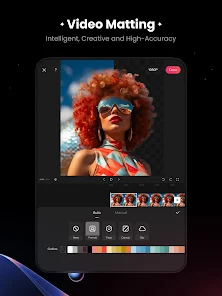
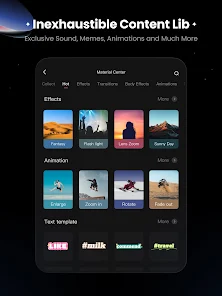
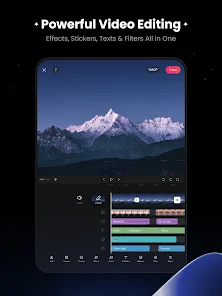
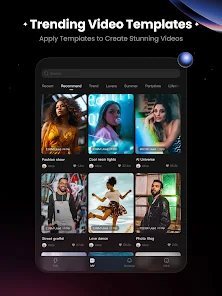
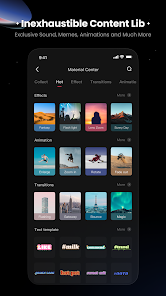
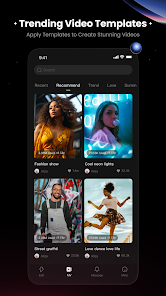

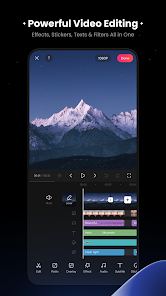
Information
- Category: Video Players & Editors
- Price: free
- Age Rating: Everyone
- Available on: /
- Developer: Kwai Technology Limited
- Updated on: Jul 3, 2026
Pros 
-
 KwaiCut - Video Editor offers a user-friendly interface for effortless editing.
 - Enjoy a wide range of filters to enhance your videos.
- Add music tracks from a vast library for a perfect soundtrack.
- Trim, cut, and merge clips with precision and ease.
- Share your creations directly on social media platforms.
Cons 
-
 KwaiCut - Video Editor has some drawbacks that users should consider.
 - The app may have limited features.
- It can be slow on older devices.
- Watermarks can be intrusive in free version.
- Export quality may be compromised.
- User interface can be confusing.
Get Installation Details  Google Play
  App Store
Google Play App Store User Reviews
(13.1K Reviews) Kosisọchukwu Agwụike2026/06/29
The app is amazing, runs smoothly on older devices too. I want to suggest to add Auto captions, importing srt files, and access to more instrumentals for background music. Thank you for putting all these efforts to give a better free alternative to those of us who can't appreciate paid editors. Thank you so much
- Dhany Rafael2026/05/05
The best video editing app after 20 apps tested ! I love that it shows all layers for fast access when editing, not collapsing them like other apps. It has the best video effects, transitions, texts, features. It has pro file export with bitrate settings. It's UI is super fluid and easy to use. am so happy. Glad I found it by accident.
- katress2026/06/12
I'm in love with this app, I've used a lot editing software in PC or phone. but this app is something crazy ngl I'll always suggest this app instead of capcut or other first of all it's totally free or also good for low end device's. animations transition everything is so smooth.. but I really need some English text template please 😭💗💗just a request... even tho, this app is perfect tysmmm for making this.
- Heng2026/06/30
This application is regarded as one of the premier video editing solutions available on the Play Store. With its extensive range of advanced features, it provides exceptional value, and I am pleased to have it installed on my device. Unfortunately Khmer unicod fonts are not supported.
- Adhinath2026/05/20
the best app made for video editing in android, especially in India, this is a great choice for those who need more effects and less lag, moreover other app I used , some have good effects but a lot of lag, and other don't lag. but also they do not have that greate effects, so this is the best choice i recommend, since even all of it is free
Review Source: Google Play store public user reviews.
FAQ
Can I submit suggestions or feedback to KwaiCut - Video Editor?
Yes, users can submit feedback through the app's support or feedback section.
Does KwaiCut - Video Editor collect my personal data?
KwaiCut may collect personal data as per its privacy policy, primarily for app functionality.
Does KwaiCut - Video Editor support offline use?
Yes, KwaiCut allows users to edit videos offline without an internet connection.
How do I cancel my KwaiCut - Video Editor subscription?
You can cancel your subscription through your app store account settings.
How much does a subscription to KwaiCut - Video Editor cost?
Subscription costs vary; check the app for the latest pricing details.
How to use KwaiCut - Video Editor
How can I contact customer service for KwaiCut?
You can reach customer service through the app's settings or visit the official website for support options.
How do I activate premium features in KwaiCut?
To activate premium features, go to the app's settings, select the subscription option, and follow the prompts to purchase.
How do I log in to my KwaiCut account?
Open the app, tap on the login option, and enter your credentials or use social media accounts to log in.
Is activation necessary for KwaiCut?
No activation is required; you can start using the app immediately after downloading it.
What is the customer number for KwaiCut?
The customer number is typically found in the app's help section or on the official website.
What's New
- -Material Center optimized: More interesting materials await your experience!-New templates available.-Fixed several known issues and optimized the editing experience.Encountering problems? Feel free to contact us at [email protected] or submit feedback via the Help Center. We will resolve your issues promptly.
Similar Apps













You May Like

FlipaClip: Create 2D Animation
Visual Blasters LLC
4.3

Photo Editor Video Maker Music
beauty app inc
4.6

Video Downloader: Browser Home
Video Downloader App Developer
4.3

Veom Rigel AI Film Generator
Kata Tech.
4.3

AI Video Maker With Music
Aquaworld Infotech
3.3

Video Editor & Video Maker
InShot Video Editor
4.8

BlackHole
fawazapp
3.9

Jellyfin
Jellyfin
4.1

YouTube Create
Google LLC
3.8

Spring - Video Editor & Maker
KineMaster, Video Editor Experts Group
4.6

AirPin PRO - AirPlay & DLNA
WaxRain Tech.
4.0

D-ID: AI Video Generator
D-ID
4.6