
 Home
Home  Apps
Apps  Games
Games  Windows
  Terms of Service
  Cookies & Privacy Policy
  About us
Spring - Video Editor & Maker

 4.6
4.6 1,000,000+ Downloads
2.1.5.36356 Version
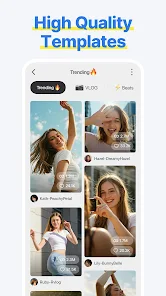
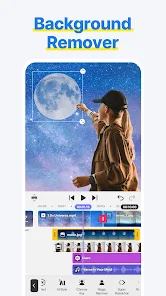
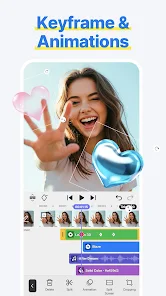
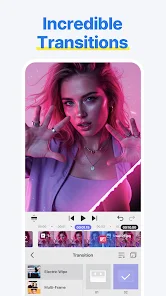
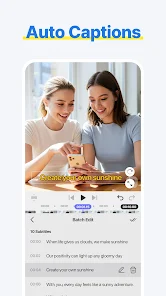
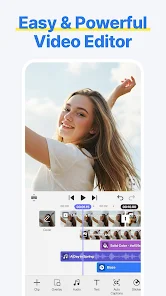
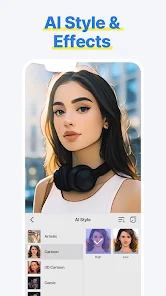
Information
- Category: Video Players & Editors
- Price: free
- Age Rating: Teen
- Available on: /
- Developer: KineMaster, Video Editor Experts Group
- Updated on: Jun 18, 2026
Pros 
-
 Create stunning videos easily
 - User-friendly interface for all
- Rich library of music tracks
- Advanced editing tools available
- Share directly to social media
Cons 
-
 Limited advanced features
 - Steep learning curve for newbies
- Occasional performance lags
- Export options can be limited
- Requires a stable internet connection
Get Installation Details  Google Play
  App Store
Google Play App Store User Reviews
(22.8K Reviews) Трифун Трифа2026/04/28
For me, this is simply better than cap cut and any other auditing phone apps. Completely add free, totally free to use (there is vip it's just nothing too important you'll be missing out without it). it's kinda tricky to get used to it, but when you do, you'll never want anything else. One of the things I'd point out is that it has built in videos (like pexels and pixabay) that are very useful if you want to make something fast and simple.
- Jose Lopez2026/04/14

so many improvements i think would greatly benefit this editor, being an annual premium member, I see the potential. An option to merge scenes together after trimming them, being able to zoom in or out a piece of media through diffrrent ways; and be able to sift through the video with a finger to see the image of all frames while zooming in our out, (rn only first and lasy frame) and please better processing speeds! overall though better than capcut,
- Jun June19822026/05/05
I like this app, and it's a bit better than KineMaster since it doesn't have a watermark. but, there is some stuff that needs to be changed. #1 is that the wiggle effect is a pro feature for some reason. and #2 is that letters like c, g, p, etc will either stay in the center of go up at the same position as stuff like b. fix this please.
- Nicolas Mejia2026/01/25
Seems to be an okay video editing app to me, but the one thing that grinds my gears is that at certain times, I'll not only go ahead and remove the outro, but the second I go and export my video without seeing the outro, I'll get this message saying "Advertisements are unavailable" or something like that, and all I end up doing is just restart my phone. But to look on the bright side is that at least this app doesn't have an annoying watermark, like the actual KineMaster app does.
- Savante452026/04/19
I’m impressed. This editor automatically transcodes the quality, which removes stuttering, especially when speeding 2x clips. With most other video editors, the preview usually lags when I set the speed to 2x, which messes up the timing with my music, after I export. This one handles it fine, Though my only issue is the overlay limit. It tells me the limit is exceeded unless I manually layer the clips, which is a bit of annoying.
Review Source: Google Play store public user reviews.
FAQ
Can I submit suggestions or feedback to Spring - Video Editor & Maker?
Yes, users can submit feedback and suggestions through the app's support section or via their official website.
Does Spring - Video Editor & Maker collect my personal data?
Spring may collect some data for functionality and improvement purposes, but it prioritizes user privacy and data security.
Does Spring - Video Editor & Maker support offline use?
Yes, Spring allows users to edit videos offline, enabling creativity without needing an internet connection.
How do I cancel my Spring - Video Editor & Maker subscription?
You can cancel your subscription through your app store settings or within the app's subscription management section.
How much does a subscription to Spring - Video Editor & Maker cost?
Subscription costs vary based on the plan chosen, typically offering monthly and yearly options for premium features.
How to use Spring - Video Editor & Maker
Can I change my account email in the Spring - Video Editor & Maker app?
Yes, go to account settings in the app to update your email address.
How can I contact customer service for the Spring - Video Editor & Maker app?
You can contact customer service through the app's support section or visit the official website for assistance.
How do I log in to the Spring - Video Editor & Maker app?
Open the app and tap on the login option, then enter your registered email and password to access your account.
How do I reset my password for the Spring - Video Editor & Maker app?
Use the "Forgot Password" option on the login screen to receive a reset link via email.
How do I unsubscribe from premium features in the Spring - Video Editor & Maker app?
Go to your account settings, find the subscription section, and follow the prompts to unsubscribe.
What's New
- Text UI Overhaul: Input, revise, style, and format directly on the Preview screenNew Text Animation: Word-by-word
Similar Apps












You May Like

FlipaClip: Create 2D Animation
Visual Blasters LLC
4.3

Photo Editor Video Maker Music
beauty app inc
4.6

Video Downloader: Browser Home
Video Downloader App Developer
4.3

Veom Rigel AI Film Generator
Kata Tech.
4.3
AI Video Maker With Music
Aquaworld Infotech
3.3

KwaiCut - Video Editor
Kwai Technology Limited
4.2

Video Editor & Video Maker
InShot Video Editor
4.8

BlackHole
fawazapp
3.9

Jellyfin
Jellyfin
4.1

YouTube Create
Google LLC
3.8

AirPin PRO - AirPlay & DLNA
WaxRain Tech.
4.0

D-ID: AI Video Generator
D-ID
4.6